Bulk launch · Google Performance Max
Performance Max bulk asset groupswithout the rebuild.
Drop your images, logos and videos, pick the Performance Max campaigns and launch a complete asset group into each one, headlines and descriptions included.
- One upload, a new asset group in every campaign
- Or new assets added to the groups you already run
- AI long headlines, headlines and descriptions
7-day free trial · No credit card · Cancel anytime
The math
An asset group is a creative bundle, and you rebuild it every single time.
Source: Google Ads Help: How asset groups work, 2026
An asset group is the creative unit of a Performance Max campaign: a themed bundle of images, a logo, headlines, descriptions, at least one video, a final URL and an audience signal that Google assembles into ads across Search, Shopping, YouTube, Gmail and Display. One Performance Max campaign can hold up to 100 asset groups. The conceptual side of that, how many to run, how to structure them, how audience signals work, is covered in the Performance Max asset groups guide. This page is about the part nobody automates: building and refreshing many of them, by hand, every week.
Why bulk asset group creation is a creative-operations problem
Unlike a Search ad group, where the lever is keywords, a Performance Max asset group has one real lever: creative plus the audience signal. That makes asset groups a creative-operations problem, not a targeting one. A retailer with five catalog lines wants one asset group per line. An account running the same offer to three audiences wants separate asset groups for each signal.
Multiply that by every Performance Max campaign and every ad account, then add the refresh: assets fatigue, the asset type performance labels turn Low, and new assets have to go in without resetting the optimisation Google has already done. The work that actually moves conversion and ROAS is not deciding the structure once. It is doing the same upload-name-place motion across many asset groups, every week, in a UI built to do it one asset group at a time. That is the exact shape of work uplads removes, on Performance Max the same way it does on Meta, TikTok, Snapchat and LinkedIn.
The one-upload model
What replaces the per-asset-group rebuild.
Upload once, reuse everywhere
Drag your creatives into the browser. Files are deduplicated automatically, so a tested asset re-launches in seconds instead of being re-uploaded into each asset group.
One creative set, many asset groups
The model that fans one creative across every Meta ad set and TikTok ad group is the same one running on Google: one set across many Performance Max asset groups.
Copy written to Google's limits
The AI drafts long headlines, headlines and descriptions within Performance Max's counts and character limits. Name tokens like {campaign} and {date} name every asset group.
Refresh without a cold restart
Add new assets to many asset groups in one pass, the way the Meta and TikTok flows re-launch a refreshed creative set without rebuilding from zero.
All or nothing
The whole launch is created in one step, so a half-built asset group never goes live. You see the result per campaign.
Built for every network
Google, Meta, TikTok, Snapchat and LinkedIn run the same single workflow. Your plan, creatives and naming templates carry across all five.
The Performance Max launcher is not a separate product; it is the same flow you run for Meta ad sets and TikTok ad groups, creating asset groups instead.
Inside uplads
Performance Max to App, on one screen.
Pick the channel, pick the campaigns, drop the creatives. uplads builds the asset groups or ads with headlines and descriptions written to Google's limits.
- New asset groups, or new assets for existing ones
- Performance Max, Demand Gen, YouTube and App
- Headlines and descriptions drafted by AI
7-day free trial · No credit card
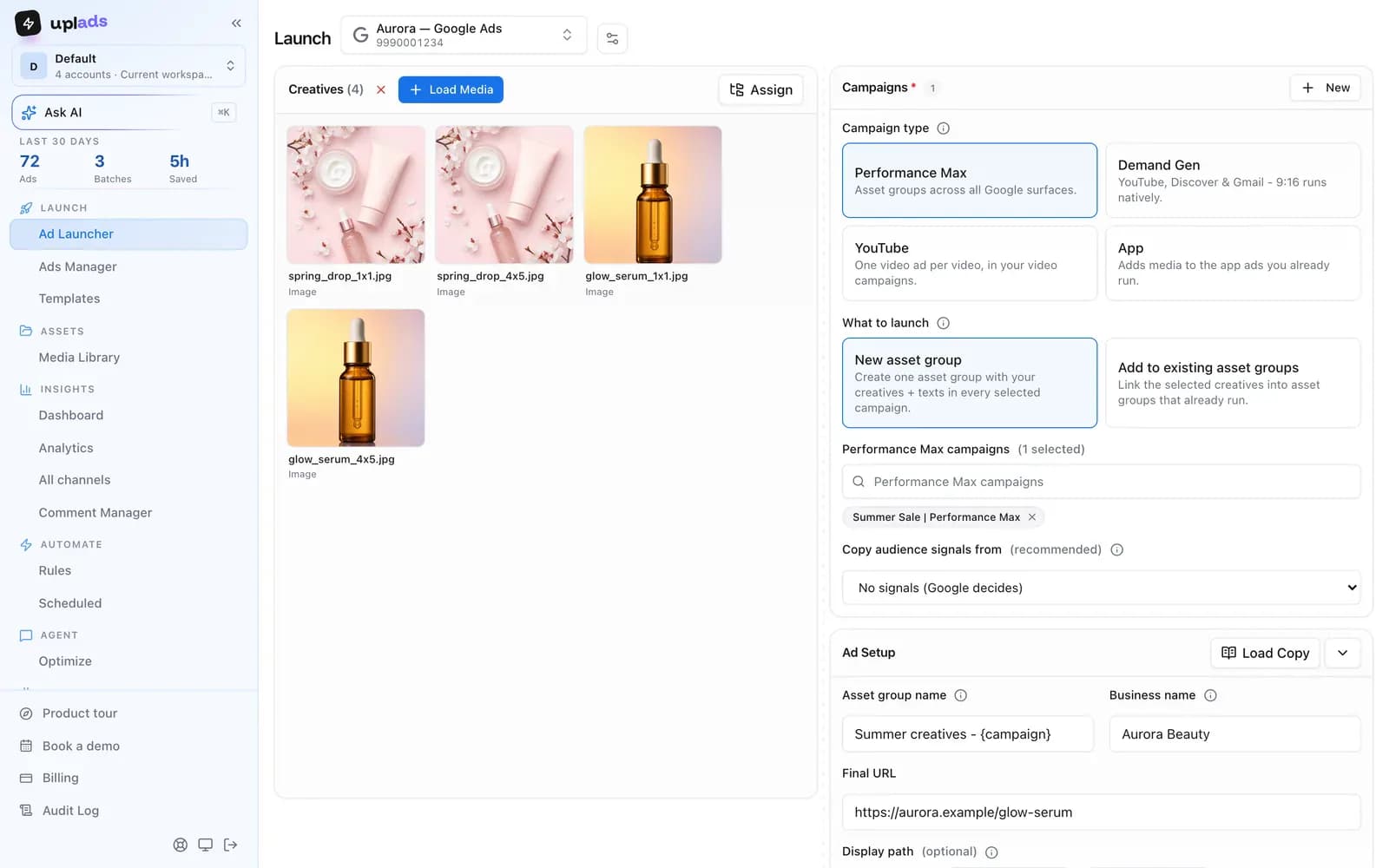
How the one-upload model maps to asset groups
The realistic ways to create Performance Max asset groups in bulk are the Google Ads UI, the Google Ads Editor and the Google Ads API. Each one works. Each one also keeps the creative-operations work manual or in code, which is the step that does not scale when you launch and refresh every week. The one-upload flow is built to remove the middle steps.
The flow
From a folder of creatives to live asset groups, no rebuild.
- 01
Connect your ad account
Sign in to Google once. Access tokens are encrypted at rest, and every connected customer becomes selectable in any future launch.
- 02
Drop your creatives
Drag your images and videos into the browser. Each file is fingerprinted and uploaded directly to secure cloud storage, deduplicated against everything you have launched before.
- 03
Pick your campaigns
Choose the Google customer and the Performance Max campaigns the launch should hit, or create a new one. One creative set can go into all of them.
- 04
Write the copy
Let the AI draft long headlines, headlines and descriptions, or type your own. Name the asset group once with tokens like {campaign} and {date}.
- 05
Launch and track
uplads creates the whole launch in one step, all or nothing, and reports the result per campaign in one live view.
The only thing that changes between networks is the target picker: where you choose Meta ad sets or TikTok ad groups, you choose Performance Max asset groups. Everything before and after that step is identical, which is exactly how TikTok and Snapchat joined before Google.
What Performance Max expects from a creative set
Google is stricter about the bundle than Meta is about an ad. An asset group wants images in more than one ratio, a logo in at least one square variant, several headlines and descriptions within their character limits, and at least one video. Leave out the video and Google generates one for you from your assets, which is rarely the video you would have chosen.
That is why the upload step matters more here than it looks. The same folder that fans across Meta ad sets needs its ratio variants present for Performance Max, and a launch that carries them is a launch that does not come back with an incomplete asset group a day later. Filename ratio tokens do that work: the 1×1, 4×5 and 16×9 cuts of one concept arrive as one set rather than three unrelated uploads.
How it compares to building asset groups by hand
The Google Ads UI, the Editor and the API each create asset groups in bulk, and each one keeps the work in a screen, a desktop app or in code. The one-upload model trades that for a browser launch with the naming convention applied automatically. Here is the side-by-side.
vs. the status quo
What the one-upload model does that the manual rebuild does not.
Scroll →
The row that matters is the second one: the UI, the Editor and the API all ask you to build each asset group by hand, in a screen, a desktop app or in code. The one-upload model does not, and it runs the identical workflow for Meta, TikTok, Snapchat and LinkedIn in the same workspace.
Build your next asset groups in minutes
Connect Google Ads and your Performance Max campaigns show up in the launcher in about a minute. 7 days free on the full Growth plan, no credit card.
Launch, then manage it in the same place
Launch into the Performance Max campaigns you already run, or create a new one in the launcher. Afterwards the Google Ads Manager in uplads edits status, budgets and names across campaigns, edits and duplicates asset groups, and shows performance over time. Your bid strategies stay exactly where you set them unless you change them.
Your files stay in your creative library for reuse. Naming conventions keep launches organised. Check pricing for platform availability and account limits. For the broader Google picture see the Google Ads bulk upload page, for the other networks the Meta ads launcher, the TikTok ads launcher, the Snapchat ads launcher and the LinkedIn ads launcher, and for the cross-network picture the multi-platform overview.
Stop rebuilding asset groupsone bundle at a time.
One upload, a complete asset group in every campaign, copy included. 7 days on the full Growth plan, no credit card.
No credit card · Cancel anytime