Bulk launch · Snapchat ads
Snapchat ads bulk uploadwithout building them one by one.
Drop your vertical videos and images, pick the ad squads, set brand name and headline once, and launch a Snap Ad for every creative in every ad squad.
- One creative set, fanned across many ad squads
- New campaigns and ad squads created on the spot
- AI headlines within Snapchat's 34 characters
7-day free trial · No credit card · Cancel anytime
The status quo
Snapchat Ads Manager builds one ad, in one ad squad, at a time.
Source: Snapchat Business Help: Instant Create, Advanced Create and duplication, 2026
If you run a weekly creative test on Snapchat, you know where the time goes. Ads Manager is built around one ad inside one ad squad: Instant Create for the quick single ad, Advanced Create for the full campaign and ad squad tree, and duplication for everything after that. None of it is hard. It is just the same motion repeated per creative and per ad squad, followed by a renaming pass so the reporting reads cleanly a week later.
uplads deletes that motion. You drop your creatives in the browser, pick the ad squads the launch should hit, pick a naming template, and one launch fans every creative across every ad squad you selected. Launch into the ad squads you already run, or create a new campaign or ad squad in the same screen. Snapchat went live for every customer on 2 September 2026 and runs the identical flow as Meta, TikTok, Google Ads and LinkedIn, so a week that spans several networks is one workflow rather than five.
The one-upload model
What replaces building ads one at a time.
Upload once, reuse everywhere
Drag your creatives into the browser. Files are deduped automatically, so an asset you have already tested re-launches in seconds instead of being uploaded again.
One creative set, many ad squads
One creative set fans across every Snapchat ad squad you select in a single launch, and across Meta ad sets, TikTok ad groups, Google asset groups and LinkedIn ad groups on the same screen.
Naming applied at launch
Compose a naming template from tokens once. It is stamped on every ad as it is created, so reporting is clean with no rename pass afterwards.
One bad ad won't kill it
Launches run in the background and isolate failures per ad. A single rejected creative is one red row, not a broken batch, and a retry fills only the gaps.
Headlines by AI
Draft Snap Ad headlines within Snapchat's 34-character limit, in your brand voice. The brand name comes from the ad account.
New campaigns on the spot
Create a campaign or ad squad from the launcher, empty or duplicated from one you already run, and launch the ads into it in one go.
How the one-upload flow works
The flow
From a folder of creatives to live Snap Ads.
- 01
Connect your ad account
Sign in to Snapchat once. Access tokens are encrypted at rest, and every connected ad account becomes selectable in any future launch.
- 02
Drop your creatives
Drag your videos and images into the browser. Each file is fingerprinted, uploaded directly to secure cloud storage and deduped against everything you have launched before.
- 03
Pick your ad squads
Choose the ad account and the ad squads the launch should hit, or create a new one. One creative set can go into all of them at once.
- 04
Set brand and headline
Brand name and headline once for the batch, or let the AI draft the headline. Your naming template is applied to every ad.
- 05
Launch and track
A background worker uploads the media to Snapchat in chunks, creates the ads and isolates per-ad failures. Progress reports into a single live view.
Switching between networks changes exactly one step: the target picker. Where a Meta launch picks ad sets and a TikTok launch picks ad groups, a Snapchat launch picks ad squads. Everything before and after that step is identical.
Inside uplads
Snap Ads for every ad squad, in one go.
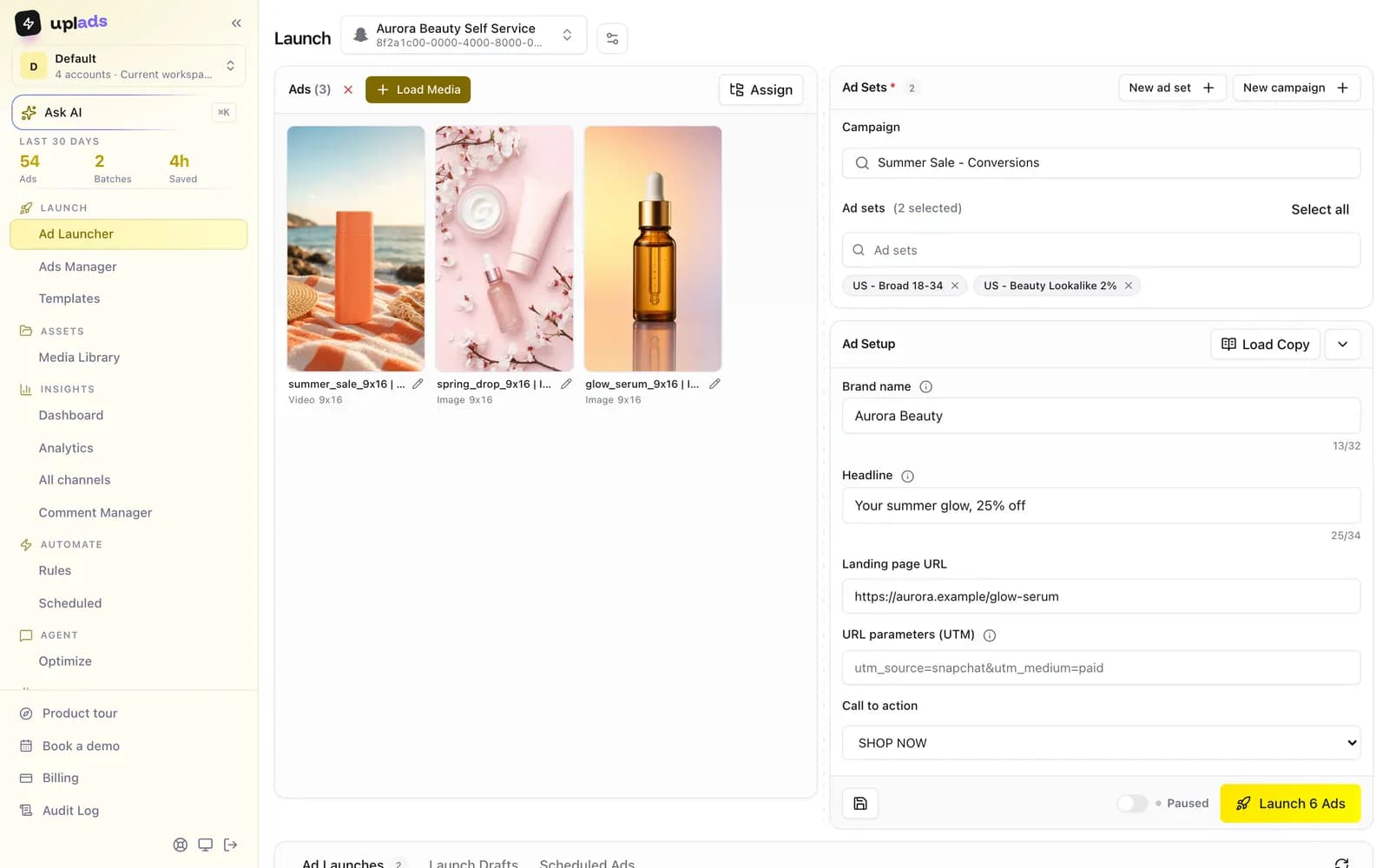
Drop your vertical creatives, pick the ad squads, set brand name and headline once. uplads builds one Snap Ad per creative in every ad squad.
- One batch across every ad squad you pick
- Create a campaign or ad squad on the spot
- Headlines within Snapchat's 34 characters
7-day free trial · No credit card
Vertical video is the whole format, which cuts both ways
Snapchat has no feed placement to fall back on. The ad is a full-screen 9:16 surface, which makes the creative requirement simpler than Meta's and the volume requirement harder: there is one shape to produce, and you need a lot of it, because a single vertical concept fatigues quickly against a young, high-frequency audience.
That is why the bottleneck on Snapchat is almost never the ad set. It is the number of finished vertical cuts you can get live per week. A launcher that takes twenty of them into six ad squads in one pass changes the cadence a small team can sustain; a launcher that saves you two clicks per ad does not.
How it compares to Snapchat Ads Manager
Snapchat Ads Manager is fine for a handful of ads. What uplads replaces is the mechanical stretch between a finished creative and a live ad, repeated per creative, per ad squad, every week.
vs. Ads Manager
What the one-upload model does that Ads Manager does not.
Scroll →
The first row is the one that separates them, and the last one is why teams running several networks care: Instant Create, Advanced Create and duplication all stop at Snapchat's border, so a week that spans Snapchat and Meta means running the whole motion twice in two ad managers.
Launch your next Snapchat test in minutes
Connect Snapchat and your ad squads show up in the launcher in about a minute. 7 days free on the full Growth plan, no credit card.
Launch, then manage it in the same place
After the launch, the Snapchat Ads Manager in uplads covers the daily work: status, budgets, bids and names across many campaigns, ad squads and ads at once, duplication, previews and breakdowns. Your targeting and schedules stay where you set them unless you change them.
Or ask your AI assistant. With the Snapchat Ads MCP, Claude or ChatGPT manages the Snapchat campaigns that already run: it shows why an ad was rejected, pauses, changes budgets and bids, and duplicates ad sets, paused. It also prepares new Snap Ads as a draft that opens in the launcher above, filled in. Ask "Why was the new Snap Ad rejected?" or "Turn the four new vertical videos into Snap Ads for the Spring ad sets". The ads go live when you press Launch, and anything that raises spend needs your workspace's permission and your yes in the chat.
Your files stay in your creative library for reuse. Naming conventions keep launches organised. Check pricing for platform availability and account limits. For the other live networks see the Meta ads launcher, the TikTok ads launcher, the Google Ads bulk upload page and the LinkedIn ads bulk launch page; for the cross-network picture, the multi-platform overview.
Stop building Snap Adsone ad squad at a time.
One upload, a Snap Ad in every ad squad, headlines included. 7 days on the full Growth plan, no credit card.
No credit card · Cancel anytime