Bulk launch · Google Ads
Google Ads bulk uploadwithout the spreadsheet.
Drop your images and videos, pick the Performance Max, Demand Gen, YouTube or App campaigns, and launch every asset group or ad from the browser. No Ads Editor, no CSV.
- One upload, many new asset groups or ads
- AI headlines and descriptions to Google's limits
- New campaigns created right in the launcher
7-day free trial · No credit card · Cancel anytime
The status quo
Bulk Google Ads creation today means a spreadsheet and a desktop app.
Source: Google Ads Help: Intro to bulk uploads; Google Ads Editor product page, 2026
If you have ever bulk-created Google Ads, you know the shape of it. You open the Google Ads Editor, a free desktop app you download and keep updated. You export the account, or you build a CSV from Google's template, mapping every column by hand: campaign, ad group, ad copy, keyword, bid, bid strategy. You upload the spreadsheet, preview the changes, fix the rows Google flags and apply. Then you go back through every new campaign to rename it so the reporting is not a mess. None of that is hard. It is just slow, and it is the same motion every single week.
uplads exists to delete that motion. You drop your creatives in the browser, pick the campaigns (or create one), let the AI draft headlines and descriptions, and one launch builds every asset group or ad you selected. No Editor to install, no CSV to map. Google Ads is live for every customer and runs the same flow as the Meta, TikTok, Snapchat and LinkedIn launches, from the same media library.
The one-upload model
What replaces the Editor and the CSV template.
Upload once, reuse everywhere
Drag your creatives into the browser. Files are deduped automatically, so a tested asset re-launches in seconds instead of being re-exported.
One creative set, many targets
The model that fans one creative across every Meta ad set and TikTok ad group runs on Google too: one set across many Performance Max asset groups.
Naming applied at launch
Compose a naming template from tokens once. It is stamped on every ad as it is created, so campaign reporting is clean with no rename pass after.
Copy written to Google's limits
The AI drafts long headlines, headlines and descriptions per channel, within Google's counts and character limits. Keep, edit or regenerate each line.
New campaigns on the spot
Create a Performance Max, Demand Gen or App campaign from the launcher, or add new assets to asset groups you already run.
Built for every network
Google Ads, Meta, TikTok, Snapchat and LinkedIn run the same single workflow. Your plan, creatives and naming templates carry across all five.
The Google launcher is not a separate product bolted on later. It is the same flow you run for Meta ad sets and TikTok ad groups, speaking Google's structure natively: asset groups for Performance Max, ad groups for Demand Gen, unlisted YouTube uploads for video, assets for App campaigns.
Inside uplads
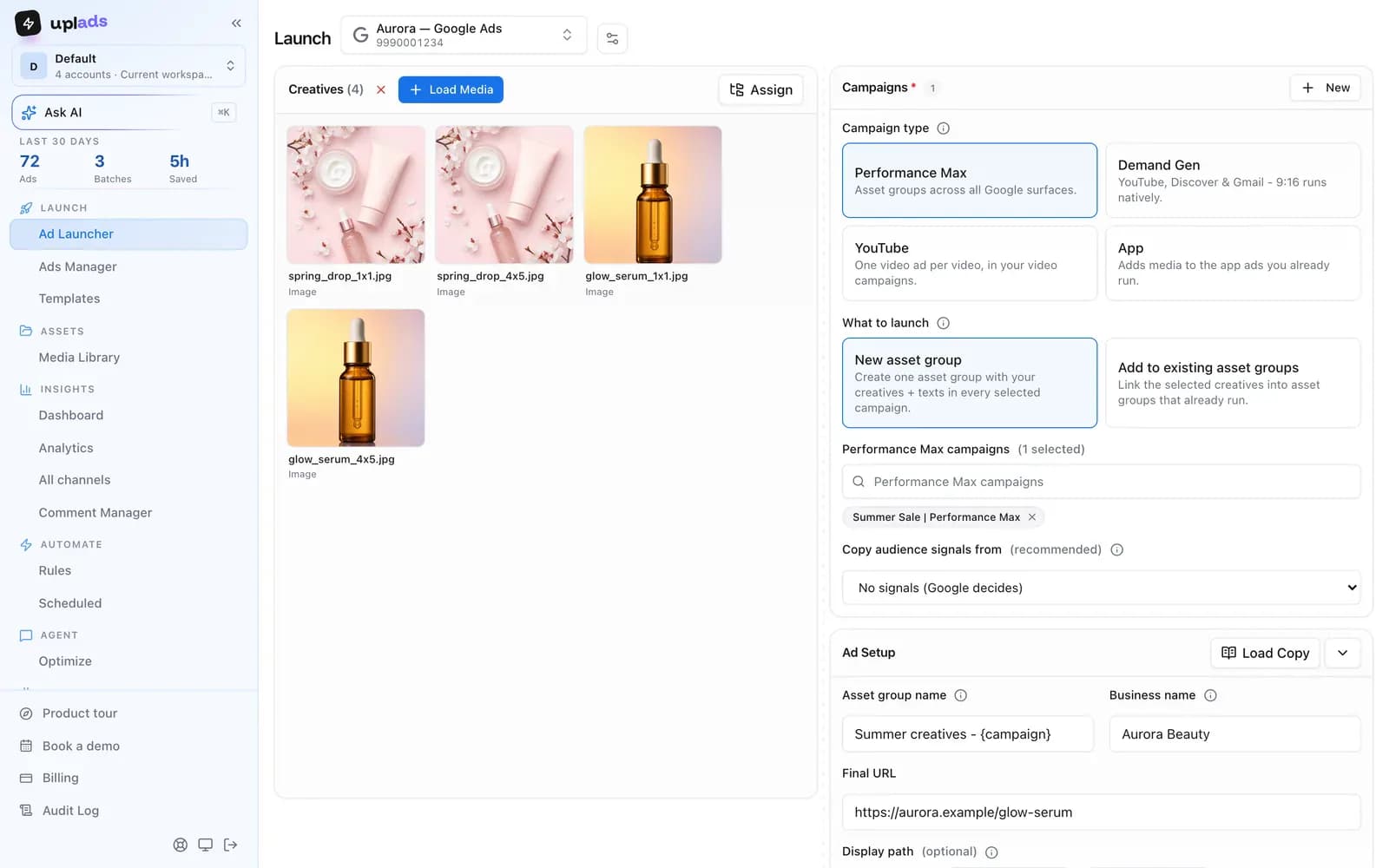
Performance Max to App, on one screen.
Pick the channel, pick the campaigns, drop the creatives. uplads builds the asset groups or ads with headlines and descriptions written to Google's limits.
- New asset groups, or new assets for existing ones
- Performance Max, Demand Gen, YouTube and App
- Headlines and descriptions drafted by AI
7-day free trial · No credit card
How the one-upload flow works
The realistic alternatives for bulk Google Ads creation are the Google Ads Editor, the CSV bulk-upload template and Google Ads Scripts. Each one is capable. Each one also moves the work into a spreadsheet or a script, which is precisely the step that does not scale when you launch every week. The uplads flow is built to remove the middle steps entirely.
The flow
From a folder of creatives to live ads, no template.
- 01
Connect your ad account
Sign in to Google once. Access tokens are encrypted at rest, and every connected customer becomes selectable in any future launch.
- 02
Drop your creatives
Drag your images and videos into the browser. Each file is fingerprinted and uploaded directly to secure cloud storage, deduped against everything you have launched before.
- 03
Pick your targets
Choose the Google customer, the channel and the campaigns the launch should hit, or create a new campaign. One creative set can go into all of them.
- 04
Pick a naming template
Compose a template from tokens. It is applied to every ad at creation time, so reporting is clean immediately with no spreadsheet rename pass.
- 05
Launch and track
uplads creates the whole launch in one step, all or nothing, so a half-built asset group never goes live. Results report into one live view.
There is no second tool, no Google Sheets step and no manual renaming afterwards. The only thing that changes between networks is the target picker: where a Meta launch picks ad sets, a Google launch picks Performance Max, Demand Gen, YouTube or App campaigns. Everything before and after that step is identical.
Four channels, not one
Google is not one surface, and a launcher that only speaks Performance Max is only half useful. uplads covers four Google channels: Performance Max asset groups, Demand Gen ad groups, YouTube video campaigns and App campaigns. They share the media library and the naming templates, and they differ where Google makes them differ, which is mostly in what a creative is allowed to be.
Performance Max wants a themed bundle: images in three ratios, a logo, headlines, descriptions and ideally a video (without one, Google may generate its own from your images). Demand Gen is closer to a social ad, with 9:16 running natively on YouTube Shorts. YouTube video campaigns are built around the video itself. That is why the copy assistant is channel-specific rather than generic: the headline counts, character limits and result shapes are not the same, and pretending they are produces ads Google rejects.
| Asset | Performance Max asset group | YouTube video responsive ad |
|---|---|---|
| Headlines | 3 to 15, 30 characters each | up to 5, 30 characters each |
| Long headlines | 1 to 5, 90 characters each | 1 to 5, 90 characters each |
| Descriptions | 2 to 5, 90 characters each | 1 to 5, 90 characters each |
| Images | up to 20 (1.91:1, 1:1, 4:5) | none |
| Logos | 1 to 5 square, landscape 4:1 optional | none |
| Videos | up to 15, at least 10 seconds each | 1 to 5 |
| Call to action | one from Google's list, or automated | 1 to 5 texts, 10 characters each |
| Business name | 25 characters | n/a |
The Performance Max column comes from the Google Ads API asset requirements, checked on 12 October 2026. The YouTube column is what uplads measured with validate-only requests against the Google Ads API on 6 September 2026: each upper bound is the last value Google accepted. The launcher checks a launch against these limits before anything is sent, so a 31-character headline or a missing long headline shows up in the browser, not as an ad Google rejects.
How it compares to the Google Ads Editor
The Google Ads Editor, the CSV bulk-upload template and Google Ads Scripts each create campaigns and ad groups in bulk, and each one keeps the work in a spreadsheet or in code. The one-upload model trades that for a browser launch with the naming convention applied automatically. Here is the honest side-by-side.
vs. the status quo
What the one-upload model does that the Editor does not.
Scroll →
The Editor, the CSV template and Scripts all ask you to leave the browser or build a spreadsheet first, and all of them stop at Google's border. The one-upload model does neither, and it runs the identical workflow for Meta, TikTok, Snapchat and LinkedIn in the same workspace.
Build your next asset groups in minutes
Connect Google Ads and your campaigns show up in the launcher in about a minute. 7 days free on the full Growth plan, no credit card.
Launch, then manage it in the same place
Launch into the campaigns you already run, or create new Performance Max, Demand Gen and App campaigns right in the launcher. Afterwards the Google Ads Manager in uplads covers the everyday work: status, budgets and renaming across many campaigns, asset-group edits and duplication, and Search campaigns with their keywords, negatives and bids. Your bid strategies stay exactly where you set them unless you change them.
Or ask your AI assistant. With the Google Ads MCP, Claude or ChatGPT manages the Google campaigns that already run: it reads search terms, pauses, adjusts budgets and bidding, and edits keywords and ad texts. It also prepares a new asset group, Demand Gen ads or YouTube video ads as a draft that opens in the launcher above, filled in, and can build one from your best Meta ads. Ask "Block the search terms in Generic that never convert" or "Turn our three best Meta ads into a new asset group in the Summer campaign". The ads go live when you press Launch, and anything that raises spend needs your workspace's permission and your yes in the chat.
Your files stay in your creative library for reuse. Naming conventions keep launches organised. Check pricing for platform availability and account limits. For the cross-network picture see the multi-platform overview; for the other live networks, the Meta ads launcher, the TikTok ads launcher, the Snapchat ads launcher and the LinkedIn ads launcher; and for the Google background, the Performance Max asset groups guide.
Stop building Google Adsin a spreadsheet.
Performance Max, Demand Gen, YouTube and App from one upload, next to Meta, TikTok, Snapchat and LinkedIn. 7 days free, no credit card.
No credit card · Cancel anytime