
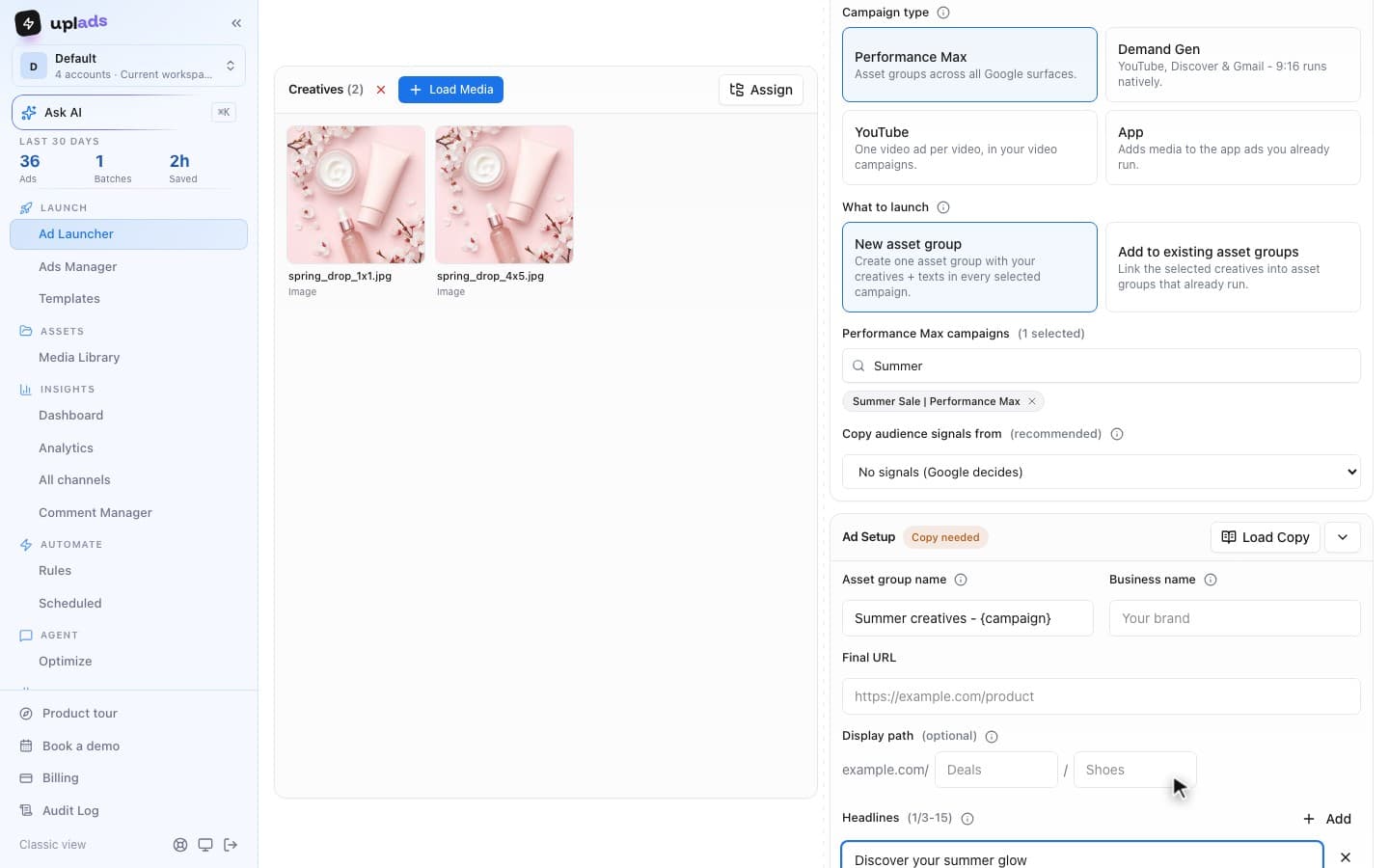
Performance Max hides almost every lever a media buyer is used to. You do not set placements, you do not set keywords, you do not set bids per audience. What you do control is the asset group, and that makes the asset group the single most important thing to get right in a Performance Max campaign. Get the structure and the creative themes right and the campaign has good raw material to optimize. Get them wrong and you are asking Google's automation to do its best with a bad brief.
I build the ad-operations tooling for an Austrian performance marketing agency that runs paid media for ecommerce brands across Meta, Google and TikTok, so asset groups are not a theory exercise here: they are a recurring build-and-refresh task across client accounts. This guide is the operator version: what an asset group actually is, how to structure it, how many to run, what goes inside, where the reporting lives, and the mistakes that quietly waste spend.
What are Performance Max asset groups?
A Performance Max asset group is a themed collection of creative and signals that Google uses to build and serve ads across all of its inventory from a single campaign.
You hand Google a bundle: a set of images in different aspect ratios, a logo, a few short headlines, a few long headlines, a set of descriptions, at least one video, your business name, a final URL, and optionally an audience signal. Google's system then mixes those assets into ads and serves them across Search, Shopping, YouTube, Display, Gmail, Discover and Maps, choosing combinations and placements by predicted performance against your conversion goal. The asset group is the creative input; the cross-channel serving and the bidding are the parts Performance Max takes off your hands.
Google's own Performance Max asset groups documentation frames an asset group as assets grouped around a common theme or audience, which is exactly the right mental model: a theme, expressed as creative, that the algorithm is allowed to recombine within.
The word "theme" is doing the work in that definition. An asset group is not a folder you dump every creative into. It is one coherent creative story - one product line, one audience, one message - given enough asset variety that Google has room to optimize without being asked to advertise three unrelated things from the same pool.
How do asset groups differ from ad groups in Performance Max?
The fastest way to understand asset groups is to contrast them with the ad group you already know, because they sit in a similar place in the campaign tree but pull a completely different lever.
In a Search campaign, an ad group is organised around keywords you choose and bid on. You control the match, the negative keywords, the bids, and the ads. The ad group is a targeting container.
In Performance Max, an asset group is organised around creative and an audience signal, and you control neither placement, nor keyword, nor bid at the asset-group level. Performance Max decides where every impression runs. The asset group only decides what creative the system starts from and which audience signal points it in a direction.
That difference has a practical consequence: you cannot structure a Performance Max campaign the way you structure Search. Splitting by keyword theme does nothing because there are no keywords to split. Splitting by match type does nothing. The only structural lever that means anything is the creative and the signal, so the only structurally meaningful question is "does this slice of the business need its own creative and its own signal?" If the answer is no, a separate asset group is just dilution wearing the costume of organisation.
What goes inside a Performance Max asset group?
An asset group is only as good as the asset variety inside it, and the spec is unforgiving of thin inputs. These are the building blocks.
Images
Up to 20. Google recommends 4+ landscape (1.91:1), 4+ square (1:1) and 2+ portrait (4:5). Cover all three ratios or you cede placements.
Logos
One square (1:1) logo is required, up to 5 in total; a landscape (4:1) logo helps on wide placements.
Headlines
3 to 15 headlines of 30 characters (Google suggests 11+) plus 1 to 5 long headlines of 90 characters.
Descriptions
2 to 5 descriptions of up to 90 characters (Google suggests 4+). This is where the offer and proof live.
Video
Up to 15 videos, each at least 10 seconds. Without one, Google may auto-generate videos from your assets.
Audience signal
Optional but high-leverage. A hint, not a hard target, that tells Google where to start looking.
The minimums and the recommendations are far apart, and the gap is where weak asset groups live. Google accepts 3 headlines, 2 descriptions and 2 images, but its asset group guidance asks for 11 or more headlines, 4 or more descriptions and at least 10 images across the three ratios. The full limits are listed in the Google Ads API asset requirements.
Two inputs deserve emphasis because they are the most common sources of weak asset groups. The first is image coverage: an asset group missing the portrait or square ratio does not compete for the placements that need those ratios, so a landscape-only asset group runs at a fraction of its possible reach.
The second is video. Performance Max will serve on YouTube whether or not you give it a real video, and if you give it nothing Google may generate one from your images and text. Per the Google Ads API Performance Max asset docs, uploading your own video stops the auto-generated ones from serving. Supplying even one purpose-made video of 10 seconds or more per asset group is one of the highest-return things you can do.
100
Hard cap per Performance Max campaign
20
Across landscape, square and portrait
15 + 5
Short (30 char) plus long (90 char)
15
Each at least 10 seconds long
Source: Google Ads API asset requirements and system limits, Google Ads Help asset group guidance, checked 12 October 2026
The asset group also carries a final URL, a business name of up to 25 characters, up to two display paths of 15 characters each, and a call to action. URL expansion, where Google can substitute a more relevant landing page from your site than the one you set, is on by default and worth a deliberate decision: it can lift performance, and it can also send traffic to pages you did not intend, so it is a setting to choose rather than inherit.
How many asset groups should you have per campaign?
Most accounts should run one to a few asset groups per Performance Max campaign, scoped to genuine creative themes, even though the technical ceiling is 100.
This is the most over-thought question in Performance Max, so here is the direct answer first: more asset groups is not more sophisticated, it is more dilution. Every asset group needs data to learn. A campaign's conversions are divided across its asset groups, so ten asset groups each get a tenth of the signal and each takes far longer to stabilise, if it ever does.
The 100-per-campaign limit is a ceiling, not a target, and treating it as a target is one of the most reliable ways to underperform.
The rule that holds up in practice: create a new asset group only when you have a distinct creative theme that also wants a distinct audience signal. A retailer with clearly separate catalog lines - say, footwear and outerwear - benefits from one asset group per line, because the images, the headlines and the signal genuinely differ. A lead-generation account with a single offer usually needs exactly one well-built asset group, because there is one message and one signal, and splitting it only halves the data. If two candidate asset groups would share the same creative and the same signal, they are one asset group with extra steps.
There is one structural decision that sits above the asset group: whether to split into separate Performance Max campaigns at all. Campaigns, not asset groups, are where budget and conversion goals are controlled. Use separate campaigns when product lines have genuinely different margins or ROAS targets that need separate budgets; use separate asset groups inside one campaign when the difference is creative and audience but the economics are the same. Getting that division right matters more than the exact asset-group count.
How to structure Performance Max asset groups
Structure asset groups by the one dividing line that actually changes the creative and the signal, and ignore every dividing line that does not.
The candidate dividing lines, in rough order of how often they are the right call:
- Product category or catalog line. The default for retail and ecommerce. Footwear, outerwear, accessories each get an asset group with their own images, headlines, descriptions and a signal built from buyers of that line. This is the cleanest structure because the creative genuinely differs and the reporting stays legible.
- Audience intent. Separating a prospecting theme from a returning-customer or high-intent theme can be worth an asset group split when the message changes materially, for example a discovery message versus a loyalty or upsell message.
- Margin or priority band. When a catalog mixes loss-leaders and hero-margin products, an asset group scoped to the high-margin set, with its own signal, stops the campaign from quietly optimising toward the cheapest, easiest sale.
- Campaign message or season. A seasonal push, a launch, or a promotion with its own creative and its own landing experience can justify a dedicated asset group for the duration.
The structure question is genuinely a creative-operations question, which is why the same discipline that governs creative testing on Meta applies here: a clear naming scheme, a defined theme per group, and a refresh cadence. The mechanical build of a single asset group is short once the theme is decided.
Building one Performance Max asset group
- 1
Name the theme
Decide the one dividing line - product line, audience, margin, message - and name the asset group so the reporting is unambiguous later.
- 2
Load full image coverage
Add landscape, square and portrait images so the group competes for every placement, not a subset.
- 3
Write headline and description variety
Several short and long headlines, several descriptions. Variety is what gives Google room to optimize combinations.
- 4
Add a real video
Supply at least one purpose-made video so YouTube delivery is not running on an auto-generated stitch.
- 5
Attach an audience signal
Add the most relevant first-party or in-market signal as a starting hint, not a hard target.
- 6
Set the final URL deliberately
Choose whether URL expansion is on, and confirm the landing experience matches the theme.
Audience signals: the lever inside every asset group
An audience signal tells Performance Max where to start looking; it does not cap who the ads can reach.
This is the most misunderstood control in the whole format. An audience signal is not a targeting setting like a Search audience or a Meta saved audience. It is a hint. You provide your best guess at who converts - a customer list, website visitors, a custom segment built from search and browsing behavior, relevant in-market or affinity segments - and Performance Max uses it as a head start for the machine learning, then expands beyond it as it finds conversions elsewhere. Google's audience signal documentation is explicit that the signal accelerates learning rather than restricting reach.
A strong, specific signal shortens the learning period and improves early efficiency. A weak or generic signal makes the system spend its way to the same understanding more slowly and more expensively.
The practical implication for asset group structure: the signal is half the reason to split an asset group at all. If two product lines would share the same best-guess audience, the case for separating them weakens. If they have genuinely different buyers, the signal difference plus the creative difference is exactly when a separate asset group earns its keep. First-party data - a real customer list, real high-value-visitor segments - makes a materially better signal than generic in-market segments, which is one of the few places where the work you put in directly shortens the learning curve.
What does Performance Max asset group reporting show?
Asset group reporting is more limited than ad group reporting, and knowing exactly what is visible keeps optimization grounded in data instead of guesswork.
Inside a Performance Max campaign there is an Asset groups tab that shows each asset group, its status, and headline performance metrics, plus an asset-level view that labels individual assets Best, Good or Low based on relative performance. That asset performance rating is the most actionable thing in the report: it tells you which specific images, headlines and videos to retire and which to keep, which turns creative refresh into a targeted operation rather than a full rebuild. Google's asset group reporting documentation covers where the tab lives and which metrics surface there.
What you do not get is the placement-and-keyword-level transparency of Search. You will not see a clean per-placement breakdown, and combination-level reporting is shallow. The honest takeaway is that asset group optimization is mostly creative work informed by the asset ratings, not bid or placement surgery, because the bid and the placement are not yours to surgically adjust. Optimize what the report actually exposes: retire Low assets, add fresh variants in the same theme, and keep the asset group fed.
Common Performance Max asset group mistakes
Most underperforming asset groups fail for a short list of repeatable reasons, and recognising them is faster than diagnosing from scratch.
The recurring ones, in rough order of how often they cost money:
- Too many asset groups, each starved of data. Splitting for tidiness instead of for a real creative-and-signal difference. The fix is consolidation, not more granularity.
- Incomplete image coverage. Landscape-only asset groups silently forfeit the placements that need square and portrait. Full ratio coverage is not optional.
- No real video. Letting Google auto-generate the video means paying YouTube rates for generic creative. One purpose-made video per asset group is a high-return fix.
- Weak or missing audience signal. Launching with a generic signal, or none, and then judging the campaign before it has learned. A specific first-party signal is the cheapest acceleration available.
- Set-and-forget creative. Asset groups fatigue like any creative. No refresh cadence means the asset ratings drift to Low and performance decays with nobody watching.
- Judging inside the learning period. More asset groups lengthens learning; reacting to early numbers before stabilisation, then restructuring, resets the clock and guarantees the campaign never settles.
Almost every item on that list is an operations failure, not a Google Ads knowledge gap. The advertiser knew the asset group needed a portrait image and a fresh video this month; the work just did not get done across every campaign and every account, because doing it by hand at that scale is the kind of mundane task teams chronically under-invest in.
Asset groups are a creative-operations problem at scale
Building one good asset group is a thirty-minute job. Building and refreshing them across many campaigns, many themes and many accounts, every week, is the actual job - and that is where the work falls apart.
My day job is ops lead at an agency running Meta, Google and TikTok for ecommerce brands, where a normal week means refreshing creative themes across a stack of client accounts. The asset group spec rewards exactly the discipline that does not survive contact with that volume: full image coverage in three ratios, fresh video per theme, 11 or more headlines and 4 or more descriptions, a clean naming scheme so the reporting is legible, and a refresh cadence so the asset ratings never decay to Low.
Each of those is trivial once. Done by hand across every asset group in every account on a weekly cadence, it is the work that quietly does not happen, which is why so many asset groups run on stale, landscape-only, video-thin creative.
This is the same creative-operations problem uplads was built to remove, and it is worth being precise about scope.
uplads is a bulk ad launch tool: you upload a set of creatives once, organise them, apply a naming convention automatically, and launch them across many destinations in one pass instead of clicking through them one at a time. That runs on Google Ads (Performance Max, Demand Gen, YouTube video and App campaigns), Meta, TikTok and Snapchat, where a single upload fans a creative across many targets with the naming template applied at launch. On Google, a launch can also start from the creatives of up to 20 existing Meta ads, and the AI copywriter fills Performance Max headlines, long headlines and descriptions within Google's character limits.
The organised, named creative library that makes a clean asset group easy to assemble and refresh is the same library uplads keeps across all four networks; the multi-platform workflow is the long version.
The hard part of asset groups is the creative operations
uplads bulk-launches creative on Google Performance Max, Meta, TikTok and Snapchat today - one organised, named, refreshable creative library across networks. See the pricing.
For now, the takeaway for Performance Max specifically is structural and unglamorous. Run as few asset groups as your real creative themes demand, never more. Fill each one to the full spec - every image ratio, real video, headline and description variety, a specific first-party audience signal. Read the asset ratings, not the placement report you wish existed, and refresh on a cadence instead of waiting for decay. Asset groups are where Performance Max gives you control; the accounts that win are the ones that treat that control as a recurring creative-operations commitment, not a one-time setup.