TikTok ads bulk upload
TikTok ads bulk uploadwithout the 500-row CSV.
Upload your videos once and launch them into every TikTok ad group you pick, Spark Ads and Smart+ included. Captions and naming for the whole batch, in one click.
- The Bulk Import spreadsheet, replaced by one upload
- One creative set, fanned across many ad groups
- New campaigns and ad groups created on the spot
Growth & Agency plans · 7-day free trial · No credit card
The status quo
Bulk launching TikTok ads today means a spreadsheet with hard limits.
Source: TikTok Ads Manager Help: Bulk Import, Bulk Duplicate, Smart+ features, 2026
If you have ever bulk launched TikTok ads, you know the shape of it. You export a template from TikTok Ads Manager, fill one row per ad (or one row per ad group for ACO creative), clear the campaign and ad group IDs so TikTok creates instead of edits, keep the file under 2MB and 500 rows, upload, then work the Export Issues sheet line by line before you publish. None of that is hard. It is just slow, it breaks on a renamed header, and it is the same motion every single week. Bulk Duplicate is faster for scaling a proven winner, but it tops out at 50 ads per batch and cannot copy at the campaign level.
uplads exists to delete that motion. It is a bulk launcher built around one upload, not a template: you drop your creatives in the browser, pick the ad groups or create new ones, write the captions once, and one launch fans every creative across every ad group you selected. No template to export, no row ceiling to plan around, no ID column to remember to clear. Meta, Google Ads and Snapchat run the identical flow on the same screen, so a week that spans several networks is one workflow instead of four. TikTok launching is included on the Growth and Agency plans.
The one-upload model
What replaces the Bulk Import spreadsheet.
Upload once, reuse everywhere
Drag your creatives into the browser. Files are deduped automatically, so a tested asset re-launches in seconds instead of being re-referenced in a new file.
One creative set, many targets
One creative set fans across every TikTok ad group you select in a single launch, and across Meta ad sets on the same screen. No 50-item duplicate cap.
Naming applied at launch
Compose a naming template from tokens once. It is stamped on every ad as it is created, so reporting is clean with no rename pass after.
Captions by AI
Up to five ad texts per launch, drafted by the AI within TikTok's 100-character limit and in your brand voice. Keep, edit or regenerate each one.
One bad ad won't kill it
Launches run in the background and isolate failures per ad. A single rejected creative is one red row, not a broken batch.
Built for every network
TikTok, Meta, Google Ads (Performance Max, Demand Gen, YouTube video and App campaigns) and Snapchat all run through this single workflow today. Your plan and templates carry across.
TikTok was not bolted on as a separate product; it is the same flow speaking TikTok's API, which is why a TikTok launch and a Meta launch are the same Ad Launcher: load media, pick ad groups or ad sets, write copy, launch. Spark Ads from creator codes or your own posts, carousels and Smart+ ad groups are covered too, so the TikTok-specific formats do not push you back into Ads Manager.
Inside uplads
Your TikTok launch, without the spreadsheet.
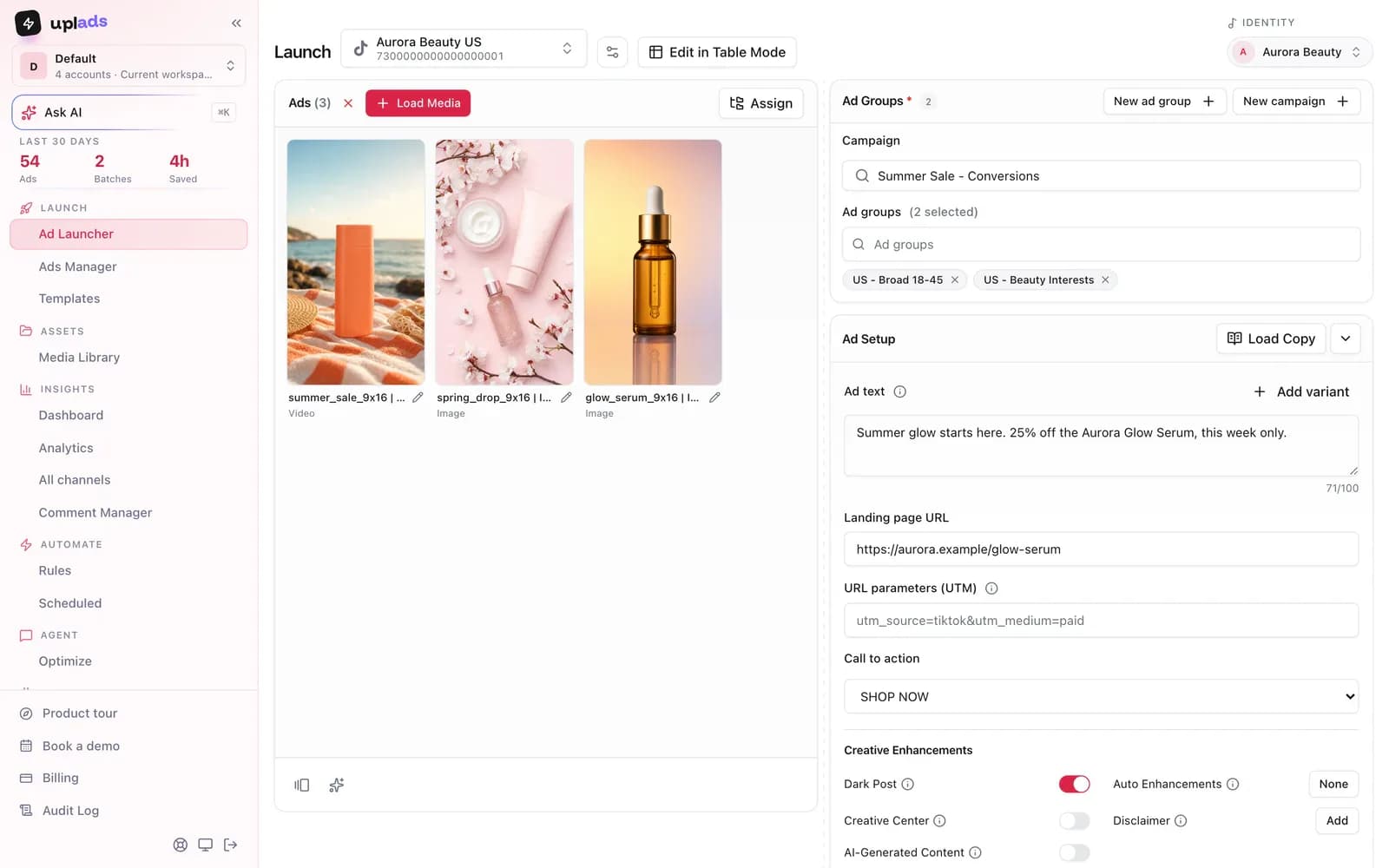
Load your videos, pick the ad groups, write up to five captions and launch. Spark Ads and Smart+ ad groups run from the same screen.
- Videos fanned across every ad group you pick
- Create a campaign or ad group on the spot
- Naming template applied to every ad
7-day free trial · No credit card
How the one-upload flow works
The realistic native options for bulk launching TikTok ads are Bulk Import, Bulk Duplicate and Smart+. Each one is capable. Each one also keeps the work in a spreadsheet, a 50-item cap or an automated black box, which is precisely the step that does not scale when you launch every week. The uplads flow is built to remove the middle steps entirely.
The flow
From a folder of creatives to live ads, no template.
- 01
Connect your ad account
Sign in to the network once. Access tokens are encrypted at rest, and every connected account becomes selectable in any future launch.
- 02
Drop your creatives
Drag your videos and images into the browser. Each file is fingerprinted and uploaded directly to secure cloud storage, deduped against everything you have launched before.
- 03
Pick your ad groups
Choose the TikTok ad account and the ad groups the launch should hit, or create a new campaign and ad group. One creative set can go into all of them.
- 04
Write the captions
Up to five ad texts for the batch, typed or drafted by AI. Your naming template is applied to every ad, so there is no rename pass.
- 05
Launch and track
A background worker creates the ads in batches and isolates per-ad failures. Progress reports into a single live view.
The launch math
Launch across multiple
TikTok ad groups.
Twelve concepts across four ad groups become 48 ads. Keep the batch together from your first upload to the final review.
- Creative concepts
- 12
- Files to upload · 1 format
- 12
- Ads across 4 ad groups
- 48
Assumes one video per concept and one ad per selected target. Example counts, not customer results.
There is no second tool, no Export Issues sheet and no manual renaming afterwards. Switching between networks changes exactly one step for you: the target picker. Where you chose Meta ad sets, you choose TikTok ad groups. Everything before and after that step is identical.
Why TikTok punishes the spreadsheet more than Meta does
TikTok creative has a shorter half-life than Meta creative, which means the launch cadence is higher and the batch sizes are smaller and more frequent. That is the worst possible shape for a template workflow: the fixed cost of exporting, mapping, clearing IDs and debugging the issues sheet is paid every time, no matter how few ads you are shipping. Ten ads cost almost as much setup as two hundred.
A browser launch inverts that curve. The fixed cost is the connection, paid once. After that, a ten-ad test and a two-hundred-ad test are the same Ad Launcher run (load media, pick ad groups, write copy, launch) with a different number in the picker, which is why teams testing TikTok weekly feel the difference faster than teams testing monthly.
How it compares to the TikTok native bulk tools
TikTok's Bulk Import, Bulk Duplicate and Smart+ each create ads in bulk, and Spark Ads add a fourth wrinkle by running off an existing organic post rather than an uploaded file. Each path keeps the work in a spreadsheet, a 50-item duplicate cap, or an automation layer you do not control. The one-upload model trades that for a browser launch with the naming convention applied automatically. Here is the honest side-by-side.
vs. the native tools
What the one-upload model does that Bulk Import does not.
Scroll →
The last row is the one that actually separates them. Bulk Import, Bulk Duplicate and Smart+ are all capable inside TikTok, and all of them stop at TikTok's border, so a week that spans TikTok and Meta means running the whole motion twice in two ad managers. That cross-network half is where the one-upload model earns its keep.
Launch your next TikTok test in minutes
Connect TikTok and your ad groups show up in the launcher in about a minute. 7 days free on the full Growth plan, no credit card.
Launch, then manage it in the same place
Launch into the campaigns you already run, or create new ones from the launcher. After the launch, the TikTok Ads Manager in uplads edits status, budgets, bids, names and ad text across many ads at once, and automated rules on the Growth plan pause ads that spend without results. What uplads does not do on TikTok yet: scheduled go-lives, catalog ads and lead forms stay in TikTok Ads Manager.
Or ask your AI assistant. With the TikTok Ads MCP, Claude or ChatGPT manages the TikTok campaigns that already run: it switches ad groups on or off, changes budgets, bids, captions and landing pages, and copies what works, switched off. It also prepares new ads, Spark Ads on your own posts included, as a draft that opens in the launcher above, filled in. Ask "Which ad groups spent the most last week without a sale? Turn them off." or "Stage the five new UGC videos into the Spring ad groups." The ads go live when you press Launch, and anything that raises spend needs your workspace's permission and your yes in the chat.
TikTok launching is available on Growth and Agency. Check current plans, explore the bulk upload workflow, read the full native walkthrough in the TikTok ads bulk launch guide, or see how the same library supports Meta, Google Ads and Snapchat launches.
Stop launching TikTok adsin a 500-row spreadsheet.
One upload, many ad groups, captions and naming applied automatically. 7 days on the full Growth plan, no credit card.
No credit card · Cancel anytime