Meta ads launcher · Facebook + Instagram
Meta ads launcher100+ ads in one click.
Load your creatives once, pick the ad sets or create new ones, and launch every Facebook and Instagram ad in one click. Named, grouped per placement, ready for review.
- One creative fanned across every ad set you pick
- Feed, Reels and Stories sizes grouped into one ad
- AI copy, naming and UTMs applied to the whole batch
7-day free trial · No credit card · Cancel anytime
The math
A weekly Meta launch should take twelve minutes, not four hours.
Source: uplads internal benchmark, 30 creative variants × 3 ad sets, May 2026
A Meta ads launcher has one job: turn a folder of finished creatives into live Facebook and Instagram ads without the manual rebuild in between. Meta Ads Manager is a capable campaign surface, but it builds one ad at a time. A weekly creative test of five angles, three audiences and two formats is fifty ads, and built by hand it is most of a Monday: duplicating, renaming, swapping the Reels cut into every ad, checking which placement got which size.
uplads collapses that into one screen. Creatives on the left, ad sets and copy on the right, one Launch button. Everything that used to be repetitive is applied to the whole batch at once, and everything that has to differ per ad can still be edited per row.
What the launcher does
Everything between finished creative and live Meta campaign.
Load media from anywhere
Drag in images and videos, or import from Dropbox, Google Drive, Frame.io or your media library. Duplicates are recognised, so a tested creative re-launches in seconds.
One creative, every ad set
Pick a creative and every ad set it belongs in. uplads fans it across all of them in one click, with no duplicating ad sets by hand.
Multi-placement grouping
The 4:5 Feed cut and the 9:16 Reels and Stories cut of one creative become a single ad that serves the right size per placement.
New campaigns on the spot
Launch into the ad sets you already run, or create a new campaign and ad set right in the launcher, empty or copied from an existing one.
AI copy for the batch
Draft primary texts, headlines and descriptions in your brand voice, translate them for multi-language ads, keep or edit every line.
One bad ad won't kill it
If Meta rejects one creative, it stays a single failed row with the exact reason. The rest of the launch goes live.
Inside uplads
The whole Meta launch on one screen.
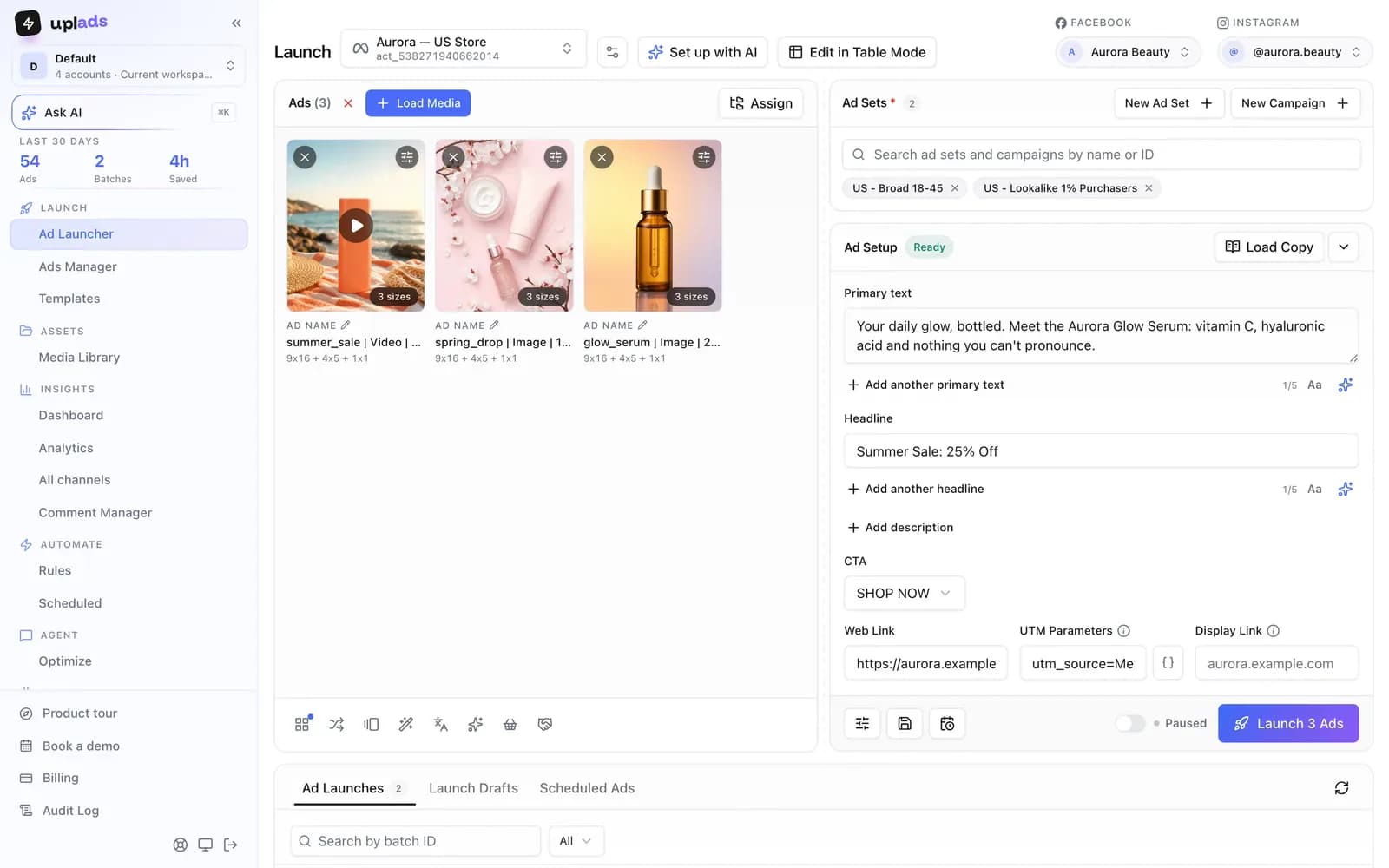
Creatives on the left, ad sets and ad setup on the right. What you see is what gets built: every ad, every name, every placement size, before anything goes live.
- Load media, pick ad sets, write copy, launch
- New campaign or ad set without leaving the screen
- Launch paused and review every ad before it spends
7-day free trial · No credit card
From folder to campaign
How to bulk launch Meta ads.
Connect Meta once, then every launch is the same four steps.
- 01
Load media
Drag 10 or 200 Facebook and Instagram creatives into the Ad Launcher, or import a Dropbox or Google Drive folder. Files upload straight to secure cloud storage.
- 02
Pick the ad sets
Choose the ad account and every ad set the batch should hit, or create a new campaign and ad set. One creative can go into all of them.
- 03
Write the copy
Type primary text, headline and CTA once for the batch, load a saved template or let the AI draft it. Switch to table mode to change copy or links per creative.
- 04
Launch
One click builds every ad in the background, named by your template, paused or live, or scheduled for a go-live time in the ad account's time zone.
The launch math
Launch across multiple
Meta ad sets.
Twelve concepts across four ad sets become 48 ads. Keep the batch together from your first upload to the final review.
- Creative concepts
- 12
- Files to upload · 3 formats
- 36
- Ads across 4 ad sets
- 48
Assumes the three placement formats are grouped into one ad per concept and target. Example counts, not customer results.
There is no second tool, no spreadsheet import and no renaming pass afterwards. The launch you configure is the launch that ships, and a rejected creative is one red row among the green ones rather than a broken campaign.
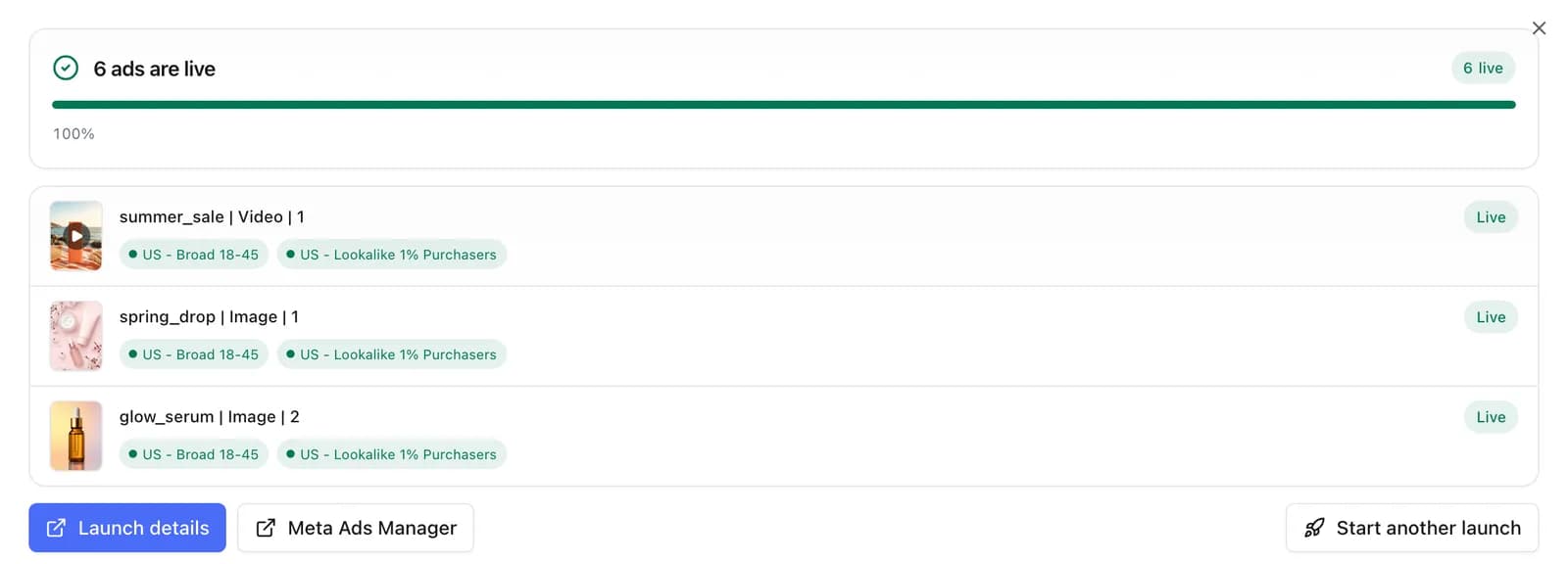
Every Meta ad format in one launcher
Most launch tools stop at single-image and single-video ads. The Meta launcher in uplads covers the formats performance teams actually run, from the same screen and the same batch:
- Multi-placement ads. One ad per concept with the right size in Feed, Reels and Stories. Name the exports per format and uplads groups them, or crop a creative to each placement right in the launcher. The mechanics are on the multi-placement page.
- Carousel and flexible ads. Build carousels card by card, or hand Meta a set of images and videos as one flexible ad and let delivery pick the best combination.
- Catalog ads. Attach a product set once and the catalog enhancement is on for every ad in the batch. See catalog ads.
- Partnership ads. Name a creator on a whole batch of your own creatives, or promote their posts by ad code, without leaving the launch. How both kinds work is on the partnership ads page.
- Lead ads. Attach an Instant Form to lead-generation ad sets as part of the batch.
- Existing ads and posts. Relaunch ads you already run into new ad sets, or turn organic Facebook and Instagram posts into ads.
Built for teams with many ad accounts
Connect every Meta ad account you manage and switch between them in one click. Each launch goes into one ad account and fans your creatives across every ad set you pick inside it, so a client's launch never leaks into another client's account. Starter covers two ad accounts, Growth five and Agency 15, with an Enterprise tier and add-on accounts beyond that. The workflow is identical in every account: same media library, same naming template, same copy templates, same review before launch. That is why agencies use it: a new client is a new account in the picker, not a new process.
Placements are a creative problem before they are a targeting problem
Meta groups its surfaces rather than listing them one by one, and each group expects a different shape. Feeds want 4:5 or 1:1, Stories and Reels want 9:16, in-stream video wants 16:9. Most teams already export those variants. The cost is not the export, it is that Ads Manager treats each file as its own ad unless you customise the asset per placement by hand, once per ad, every launch.
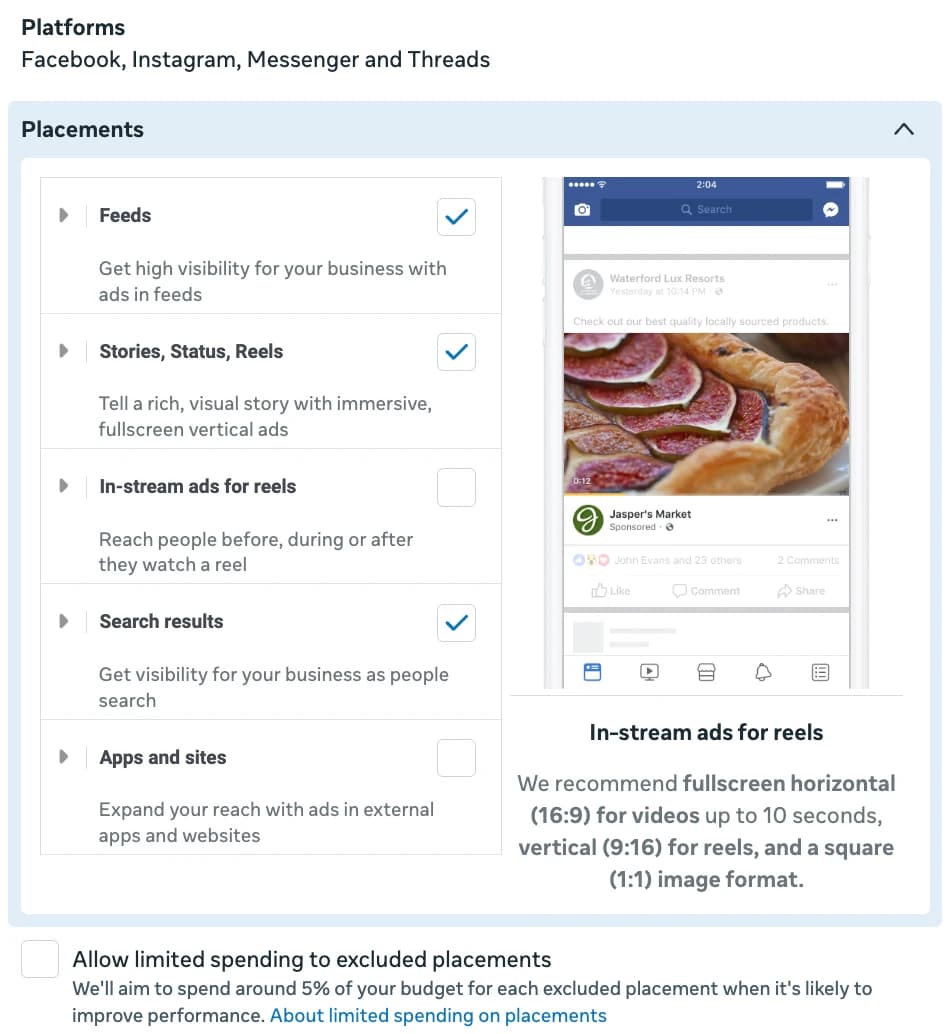
uplads reads the size from the filename, groups the variants of one concept and creates a single ad that serves the right asset per placement. It is also the reason a Facebook launch covers Instagram without a second pass: same ad, different surface.
How it compares to the native Meta workflow
The realistic alternatives are Meta Ads Manager, Meta's bulk spreadsheet import and the generalist ad platforms that treat launching as a side feature. The trade-off they share: the mechanical launch work is either fully manual or buried under a heavier product.
vs. the alternatives
What a launcher does that the native workflow does not.
Scroll →
See your own ad sets in the launcher
Connect your Meta account and your campaigns show up in the launcher in about a minute. Launch paused, nothing spends until you switch it on. 7 days free, no credit card.
After you hit Launch
Launching is half the job. The other half happens in the same workspace, so you never jump back into Ads Manager to manage what you just shipped:
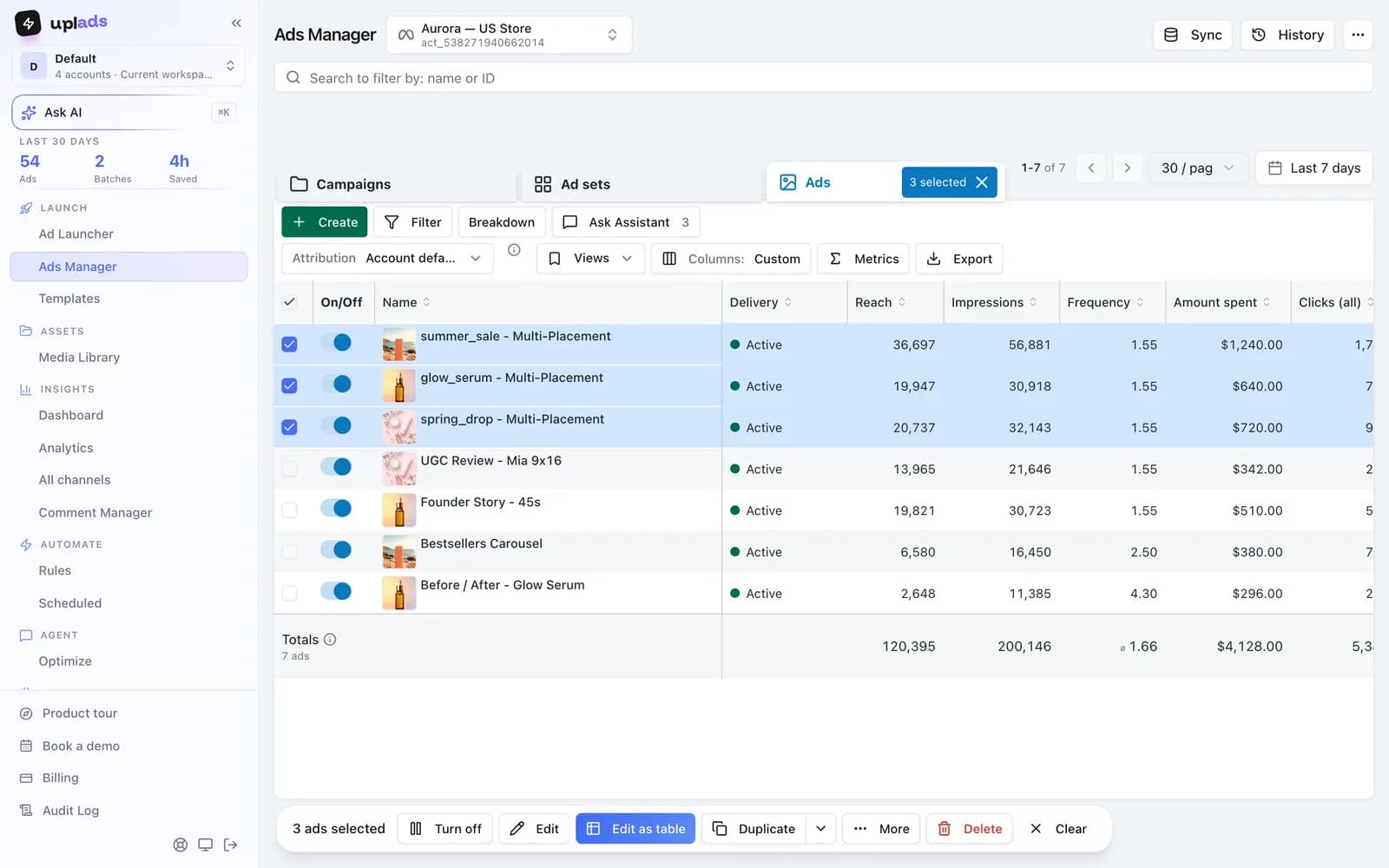
Ads Manager with bulk edits. Every campaign, ad set and ad in one table. Pause twenty ads, change budgets and bids, edit targeting, rewrite ad text or swap media across a selection, duplicate into another ad set. Columns and presets are yours.
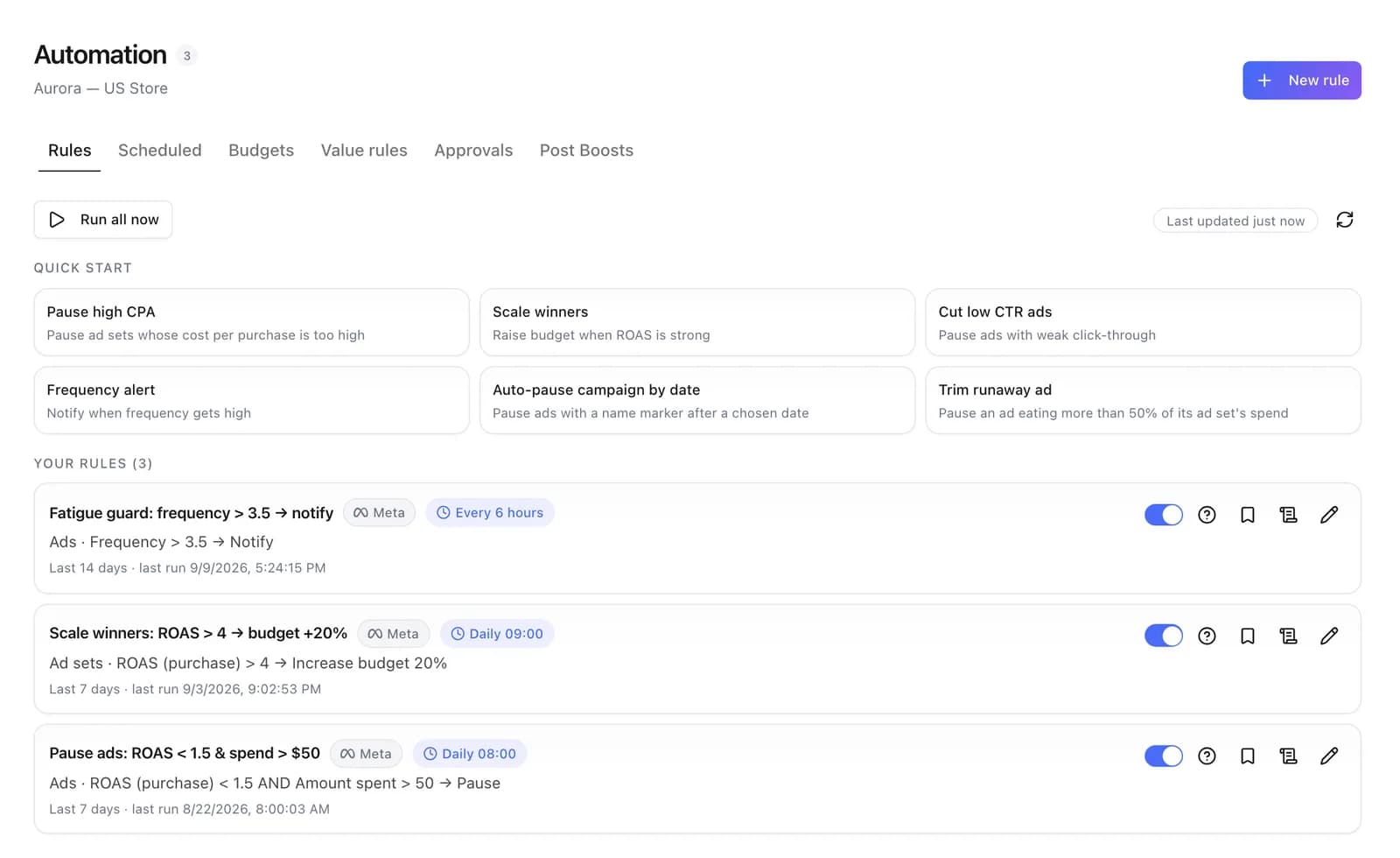
Automated rules. Pause an ad that spent 80 EUR without a purchase, get an alert when frequency climbs, raise the budget of what works within the floor and ceiling you set. Rules run as often as every 30 minutes and email, Slack or ClickUp you what changed. Weekly budget schedules raise and lower budgets on the days you choose.
AI Optimizer. An audit of the whole ad account that finds wasted spend, creative fatigue and tracking gaps, and explains each finding. It proposes; you decide what gets applied.
Claude and ChatGPT connector. With the Meta Ads MCP, in beta, your AI assistant builds campaigns and ad sets paused, stages new ads as a draft you launch, and changes what already runs, from audiences to creatives. Try "Set up next week's sale with the videos in this Drive folder, 40 € a day, Germany only" or "Exclude past buyers from the retargeting ad set". A new image or video gives an ad a new post, so its likes start over. The uplads versus Meta Business Suite comparison covers where the native tools stop.
You stay in control. Launch everything paused, review every ad before it spends, and nothing changes in your account unless you launch it, edit it or set up a rule that does. uplads works through Meta's official Marketing API with the permissions you grant.
For the details, start with bulk upload, compare the native Meta workflow, read the Facebook-side view on the Facebook ads tool page or check the plans and account limits.
Stop rebuilding the same adfifty times in Ads Manager.
One upload. 100+ Facebook and Instagram ads in one click. 7 days on the full Growth plan, no credit card.
No credit card · Cancel anytime