Bulk launch · Instagram ads
Instagram ads bulk launchwithout rebuilding every Reel by hand.
Drop your Reels, Stories and Feed cuts together. uplads groups them into one ad per concept, applies copy and naming, and launches the batch into every ad set you pick.
- One creative, fanned across every ad set you pick
- Feed, Reels and Stories variants grouped into one ad
- Your naming convention stamped on every ad at launch
7-day free trial · No credit card · Cancel anytime
The math
A weekly Instagram launch should take twelve minutes, not four hours.
Source: uplads internal benchmark, 30 creative variants × 3 ad sets, May 2026
An Instagram ads bulk launch has one job: turn a folder of finished creatives into live Instagram ads without the manual rebuild in between. That is the entire reason uplads exists. Instagram runs on the Meta ad system, so the surface where ads go live, Feed, Reels, Stories, Explore, is decided by the ad set you already configured. The slow part was never the targeting. It is the ad creation: a weekly creative test of five product angles, three audience cuts and a Reels plus a Feed cut of each is fifty ads, and built one by one in Ads Manager that eats most of a Monday.
Instagram makes that worse than Facebook, because the inventory is split hard by aspect ratio: a 9×16 cut for Reels and Stories, a 4×5 cut for Feed. Done manually, every concept becomes two or three near-duplicate ads to build, name and reconcile in reporting.
What the bulk launcher does
Everything between finished creative and live Instagram campaign.
Bulk creative drop
Drag hundreds of Instagram images and videos into one launch, or import a Dropbox or Google Drive folder. The same file is never uploaded twice.
One creative, every ad set
Pick a creative and every ad set it belongs in. uplads fans it across all of them in one click, with no duplicating ad sets and no copy-paste in Ads Manager.
Reels and Feed in one ad
A 9×16 Reels and Stories cut and a 4×5 Feed cut of the same concept become a single ad that serves the right ratio per Instagram surface.
Naming applied at launch
A token-based naming convention is stamped on every Instagram ad as it is created. Clean reporting from day one, no post-launch renaming.
Reels-ready video support
Video is a first-class creative type, so Reels and Stories video bulk launch the same way static Feed creatives do.
AI copy for the batch
Draft primary texts, headlines and descriptions within Meta's limits and in your brand voice. Keep, edit or regenerate every line.
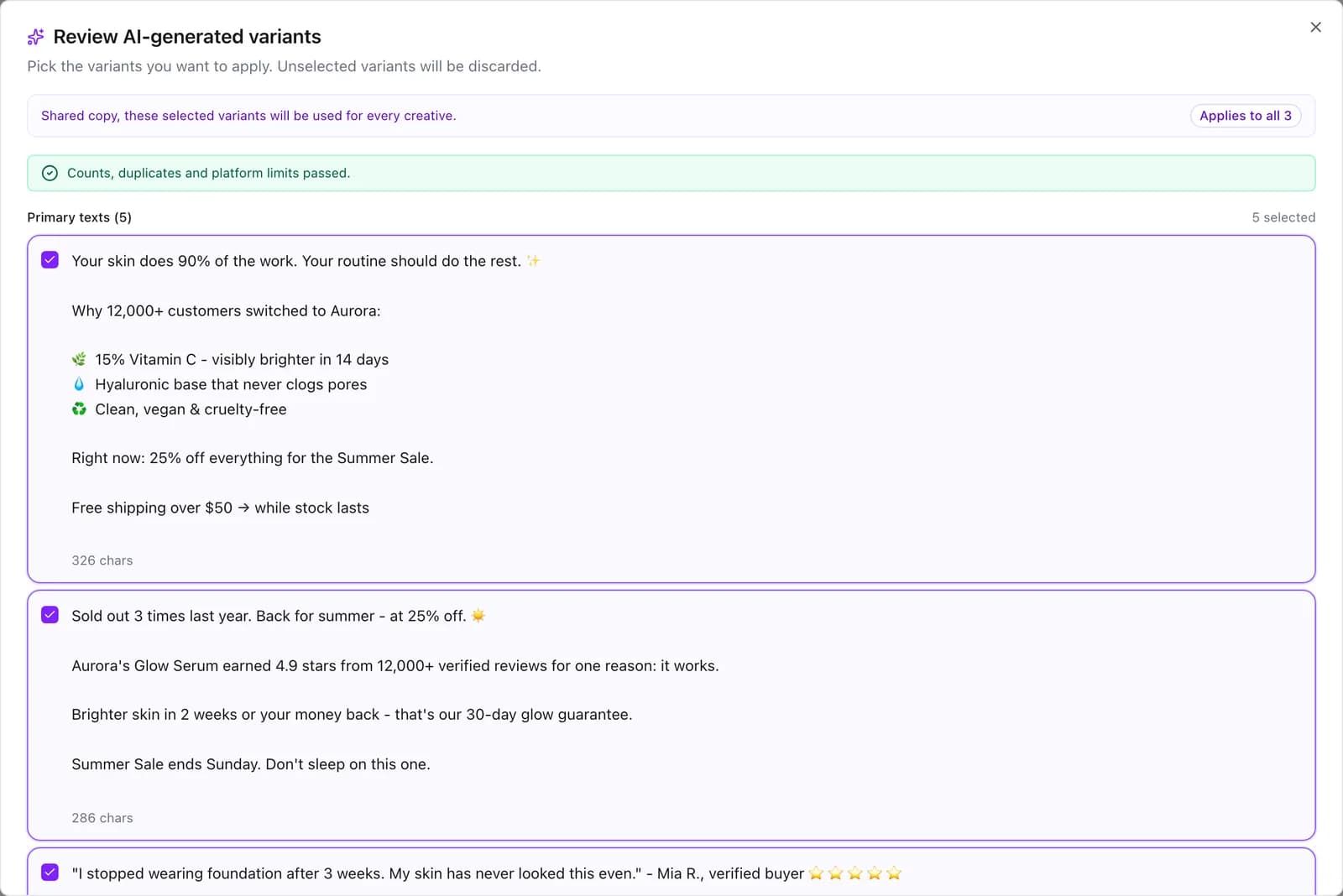
The third card is the Instagram-specific lever. On Facebook the placement spread is gentler; on Instagram, Reels and Stories are vertical-only and Feed is not, so manual launching means rebuilding the same concept per surface. uplads groups those cuts into one ad with placement-aware asset rules, so a single ad serves the 9×16 in Reels and Stories and the 4×5 in Feed. Facebook and Instagram share the same Meta system, so this launch also covers Facebook placements: the Meta ads platform overview frames the umbrella, and the Facebook ads tool page is the Facebook-side view of the same workflow.
What an Instagram ads bulk launch actually does
It removes the gap between a finished creative folder and a live Instagram campaign. You bring the creatives and the plan; it does the duplicating, the renaming, the Reels-versus-Feed size juggling and the ad-by-ad clicking in one launch instead of fifty.
If your week is shipping dozens of new Instagram ad variants and the launch itself is the bottleneck, that is the problem this tool removes. What happens after the launch, the Ads Manager, automated rules and the AI Optimizer, is on the Meta ads launcher page. For the upload step in depth, see the bulk upload feature page; for the placement-grouping mechanics, the multi-placement feature page.
Where your Instagram ads actually run
Instagram is a delivery surface of the Meta ad system, and placement lives on the ad set. If an ad set targets Instagram Feed, Reels, Stories and Explore, or uses Advantage+ placements across Facebook and Instagram, that is exactly where the ads you launch into it run. Launch into the ad sets you already configured, or create a new one in the launcher, empty or copied from an ad set whose placements already fit.
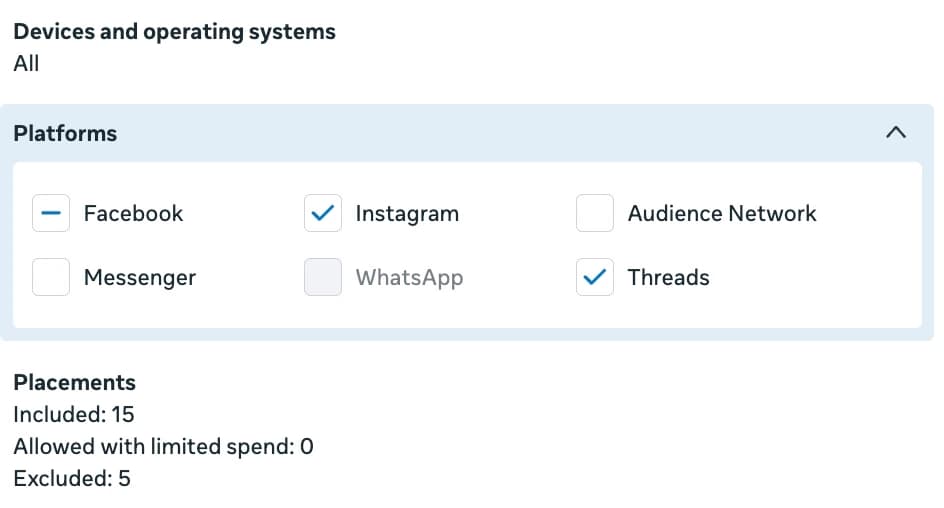
uplads is built for teams that manage several ad accounts: connect as many as your plan allows and switch between them in one click. Each launch goes into one ad account and fans your creatives across every ad set you select inside it. The per-plan ad-account count is on the pricing page.
Inside uplads
The whole Meta launch on one screen.
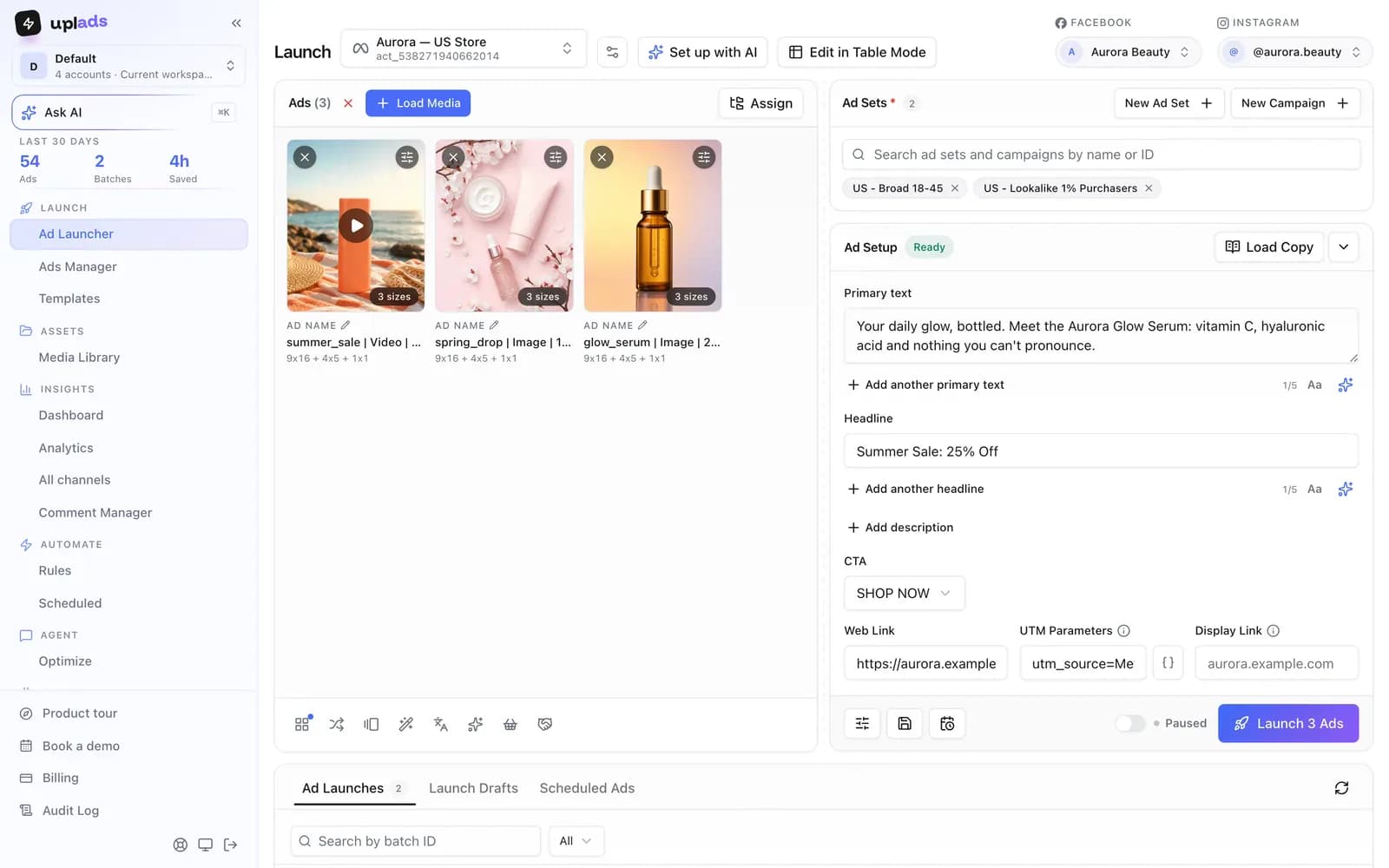
Creatives on the left, ad sets and ad setup on the right. What you see is what gets built: every ad, every name, every placement size, before anything goes live.
- Load media, pick ad sets, write copy, launch
- New campaign or ad set without leaving the screen
- Launch paused and review every ad before it spends
7-day free trial · No credit card
The flow
From a folder of creatives to live Instagram ads.
- 01
Load media
Drag your Instagram images and Reels videos into the Ad Launcher. Name the cuts per format and uplads groups them into one ad per concept.
- 02
Pick the ad sets
Choose the ad account and every ad set the launch should hit, or create a new one. Instagram placement comes from each ad set.
- 03
Write the copy
Type it once for the batch, load a template or let the AI draft it. Your naming template is applied to every ad.
- 04
Launch
One click builds every ad in the background, paused or live. Each ad shows its own result, and one rejected creative never stops the rest.
There is no second tool, no manual renaming pass afterwards and no spreadsheet to babysit. The launch you configure is the launch that ships, and a rejected creative is one red row among the green ones rather than a broken campaign.
How it compares to launching Instagram ads by hand
The realistic alternatives are the native Ads Manager, Meta's bulk import spreadsheet, and the generalist ad platforms that treat launching as a side feature next to automation rules and analytics. The trade-off they share: the mechanical launch work is either fully manual or buried under a heavier product you are also paying for.
vs. the alternatives
What a bulk launch does that doing it by hand does not.
Scroll →
Launch your next Reels test in minutes
Connect your Meta account and your ad sets show up in the launcher in about a minute. Launch paused, nothing spends until you switch it on. 7 days free, no credit card.
Why this exists
“On Instagram, every concept is at least two ads: a vertical cut for Reels and Stories, a Feed cut, sometimes a square for Explore. A five-angle weekly test is fifty ads before you have done anything clever. Nobody on a performance team should spend Monday morning rebuilding the same Reel by hand.”
Thomas Danninger · Founder, uplads
Use your existing Instagram ads setup
Keep planning and targeting where they are. Launch into the ad sets you already run, or create new ones on the spot, and launch everything paused so nothing spends before you have looked at it. After launch, the uplads Ads Manager edits status, budgets and ad text across many ads at once, and automated rules pause what doesn't work.
Your files stay in your creative library for reuse. Naming conventions keep launches organised. Check pricing for platform availability and account limits, or see the Meta Ads Manager alternatives page for a deeper side-by-side with the native surface.
Stop rebuilding the same Reelfifty times in Ads Manager.
One upload. Reels, Stories and Feed in one ad, 100+ ads in one click. 7 days on the full Growth plan, no credit card.
No credit card · Cancel anytime