Bulk Facebook ads upload
Bulk facebook ads upload,without the spreadsheet.
Bring your images and videos into one library. Apply copy, naming and placement groups to the batch, then launch into your selected ad sets.
- 200-file drag-and-drop, deduped automatically
- Multi-placement grouping built in
- Naming template applied at launch
7-day free trial · No credit card
The math
A weekly launch should take fifteen minutes, not four hours.
Source: uplads internal benchmark, May 2026
The Meta Ads Manager UI was not designed for the way performance teams and media buyers actually work in 2026. A weekly launch, five product angles, three audience cuts, two aspect ratios, a mix of static, video and carousel ads, is fifty ads. Built one by one through the official interface, that is four hours of clicking. Built through Meta's own bulk Excel import, it is the same four hours plus a debug cycle when one row breaks the file.
uplads replaces that loop with a single drag-and-drop pass, an asynchronous worker and a naming template that fires at launch time instead of being cleaned up afterwards. This page walks the workflow and the pieces underneath it.
From creative files to Facebook & Instagram ads
Set up your ads in bulk. Review them individually.
Upload once, reuse on your next launch
Drag in your files or import from your connected cloud storage. Find the same creative again when your next test is ready.
Group placement formats in one ad
Group creative variants by placement. Apply ad copy and naming across the batch, with individual adjustments where needed.
Check your ads before publishing
Check your targets, copy and creative groups before launch. Follow each ad's result and see which items need attention.
What bulk facebook ads upload actually means in 2026
Bulk facebook ads upload is the workflow of creating many Meta ads in a single operation, against a single naming convention, against multiple ad sets, with multi-placement aspect ratios handled inline. It is not a simple multi-file picker. Six things go wrong if you treat it as one:
- The same creative needs two aspect ratios (4×5 for Feed, 9×16 for Stories and Reels) and they need to ride on a single ad, not on two parallel ads, otherwise reporting and frequency get muddied.
- Naming conventions need to be applied at launch time. Renaming fifty ads after the fact in Ads Manager is its own four-hour task.
- One bad creative, a policy rejection, a transcode error, an audio sync warning, should not block the other forty-nine. The Excel import treats this as a failed import; the API does not have to.
- Re-launching a tested creative across new ad sets should not require a re-upload. The file is already on disk somewhere.
- Catalog-driven creatives should be able to enable the Add Catalog Items enhancement on every ad in the batch without per-ad clicking.
- Progress visibility matters. A launch that disappears into "uploading…" for ten minutes is indistinguishable from a launch that quietly died.
Every uplads design decision on the bulk-upload page is downstream of one of those six.
How a bulk launch flows through uplads
Your next creative batch
From files to live ads in one continuous pass.
- 01
Drop your creatives
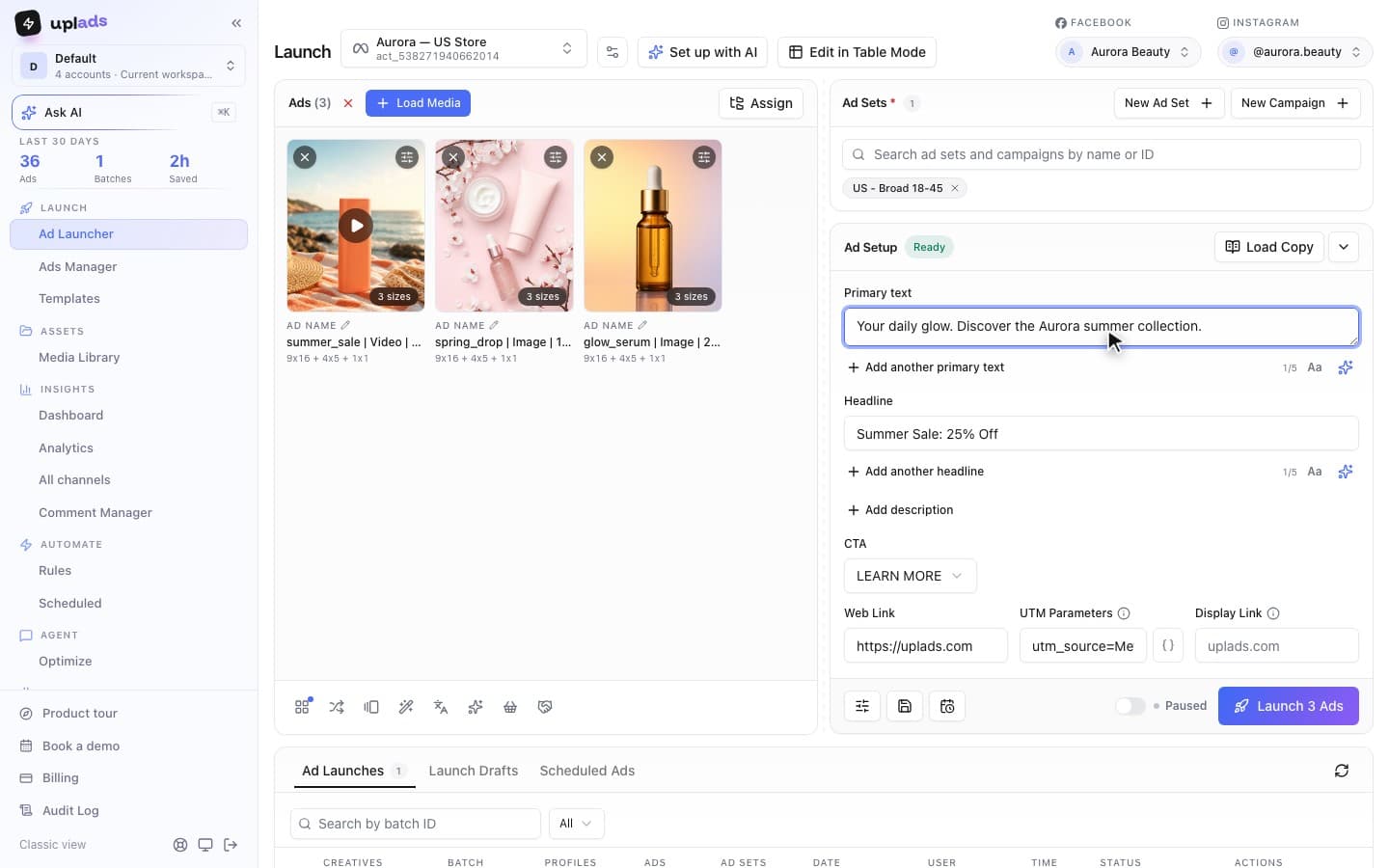
Drag 50-200 files into the browser. Each file is fingerprinted in the browser and uploaded directly to secure cloud storage. Files you have used before are recognised by their fingerprint and surface from your existing library.
- 02
Pick ad sets and accounts
Select the ad sets this launch should hit. Each chosen creative is fanned out across every selected ad set in a single launch.
- 03
Pick a naming template
Compose a template from the available tokens: filename, file type, an auto-incrementing ID, a date and your own custom text, joined by your preferred separator. Applied to every ad at launch time.
- 04
Group placements automatically
If you uploaded creative_4x5.mp4 and creative_9x16.mp4, uplads groups them into a single ad that serves the right ratio per placement.
- 05
Click launch
The job enters a background worker. The UI returns immediately and a progress view tracks each ad as it is created.
- 06
Watch ads land
The worker creates ads in batches of fifty against the Meta Marketing API. Each ad's success or failure is recorded individually. One rejected ad does not stop the other forty-nine.
That sequence is the actual workflow. There is no Excel template anywhere in it, and there is no upload, then configure, then upload again loop. The configuration step is the launch step.
The launch math
Launch across multiple
Meta ad sets.
Twelve concepts across four ad sets become 48 ads. Keep the batch together from your first upload to the final review.
- Creative concepts
- 12
- Files to upload · 3 formats
- 36
- Ads across 4 ad sets
- 48
Assumes the three placement formats are grouped into one ad per concept and target. Example counts, not customer results.
The reliability piece: why batches of fifty, not one giant call
Meta's Marketing API will technically accept very large requests. The reason uplads chunks into batches of fifty is operational, not technical. At fifty:
- Any single batch failure is bounded to fifty ads. The retry surface is small.
- Per-ad responses come back from Meta inside one round-trip, so the worker can mark each ad as success or failed in a single transaction.
- Transient API hiccups (rate limits, intermittent 500s) are retried at the batch level up to twice before being escalated to permanent failure on that single ad.
The result, from the user's perspective: a 200-ad launch shows up as four batches in the progress view, and a policy-rejected ad shows up as one red row among 199 green ones. The launch never aborts because of an isolated problem.
The naming engine: clean reporting from day one
Naming conventions get talked about a lot and applied almost never. The reason is mechanical: applying a naming template to fifty ads inside Ads Manager means manually renaming fifty ads. So the template lives in a Notion page somewhere and the actual ad names drift.
uplads inverts that. You define the template once, for example Brand | Audience | filename | id | yyyy-MM-dd, and every ad created in every batch picks it up automatically. The available tokens are:
- Filename: the creative's original name, with optional aspect-ratio stripping (so
creative_4x5.mp4becomescreativein the ad name). - File type: image or video, useful for filtering reports by creative type.
- ID: an auto-incrementing per-launch ID, so each ad in the batch is unique even when the rest of the template matches.
- Date: the launch date, in one of five common formats.
- Custom text: any string you want hard-coded, like a campaign or product code.
The naming template is part of the launch configuration, not a post-launch cleanup. Reporting in Ads Manager, or in your warehouse, is clean from the moment the launch finishes. The naming conventions page has the token reference.
Multi-placement grouping: one ad, two ratios
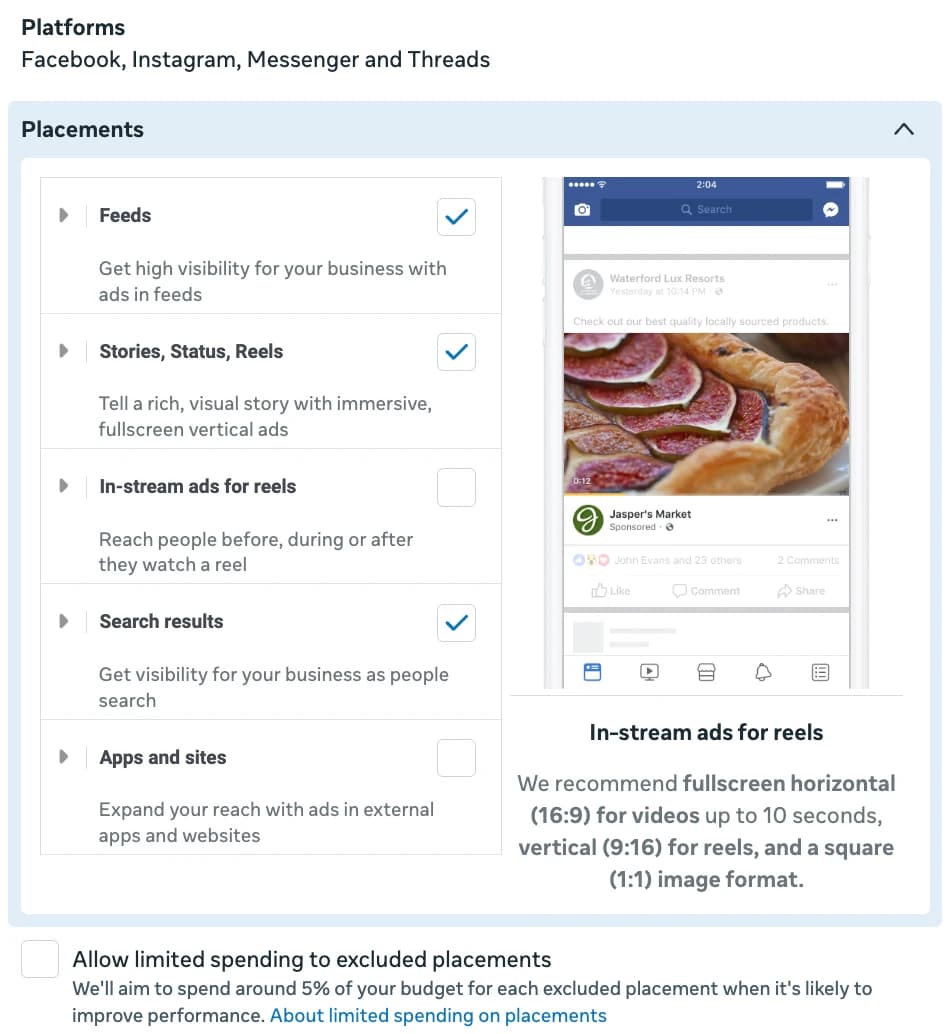
The 2026 placement reality is that a Reel and a Feed post want different aspect ratios from the same creative concept. The native Meta path is to either accept that one aspect ratio looks bad on the other placement, or create two parallel ads, which fragments reporting and inflates the ad count.
uplads detects matching aspect-ratio variants by filename pattern and groups them into a single ad with placement-level asset customisation. Drop summer_sale_4x5.mp4 and summer_sale_9x16.mp4 in the same launch and uplads creates one ad that serves the 4×5 on Feed and the 9×16 on Stories and Reels. Two ratios, one ad, one report row.
See the multi-placement product page for the full grouping logic.
Re-launching without re-uploading
The bulk-upload workflow is rarely a one-shot. The same creative gets relaunched against new audiences, against new product sets, into a new campaign three weeks later. Re-uploading is wasted bandwidth and wasted time.
uplads fingerprints every uploaded file in the browser before it goes to storage. The same file, re-dragged, is recognised and surfaces from the existing library: no re-upload, no duplicate storage. The creative grid is the library; the bulk-upload screen is the launch. They are the same surface.
This matters most for creative testing workflows where the same four base creatives, static images, videos, carousel cards, go out across five audience variants on Monday, then five different audiences on Wednesday. The Monday creatives are already on disk when Wednesday's launch starts.
The version where you do not open the screen at all
Everything above describes the launch surface. There is now a path that skips it for the mechanical part of the job.
uplads runs an MCP connector, in beta and included in every plan. MCP is the open standard behind the connectors already in Claude's and ChatGPT's settings, so connecting takes a sign-in and no key. Once it is connected, a brief becomes a staged launch: point the assistant at a Dropbox or Drive folder with a budget, a date range and a geography, and it imports every creative behind that link, writes the primary texts and headlines, creates the campaign and ad sets, always paused, holding no ads, so nothing can spend while you read, and stages the launch in the Ad Launcher described above.
What lands in your hands is a review link, not live ads. You open the ordinary launch screen with everything pre-filled, change whatever you want and press Launch. Teams that want the fully remote version can allow autonomous launching per workspace, with a daily budget ceiling the assistant refuses to cross.
The full capability list, and the list of things it deliberately refuses to do, is on the MCP page.
Where the workflow goes when Meta isn't enough
uplads's first-class platform is Meta, Facebook and Instagram, and that is the surface this page describes. The same workflow is live for TikTok (ad groups, Spark posts, identities), Google Ads (Performance Max asset groups, Demand Gen ad groups, YouTube video and App campaigns) and Snapchat (ad squads) on the Growth and Agency plans. On pricing there is no per-network surcharge: you pay for ad accounts and storage. Starter covers Meta, and Growth and Agency add TikTok, Google Ads and Snapchat.
Today that means: if your week runs on Meta, TikTok, Google Ads or Snapchat, uplads covers it now, with one media library and one set of naming templates behind all four.
See the launch flow on real ads
Every plan starts with a 7-day free trial, enough to push real bulk launches through the workflow before you commit to a tier.
How uplads fits next to the rest of the bulk-launch market
A handful of tools live in the bulk-launch space. The honest read on them, from inside an agency that ships paid ads daily, is that each one solved a slightly different problem:
- Meta's own Excel bulk import is the reference implementation: free, official and brittle. One bad row fails the import. No multi-placement grouping. No fingerprinting. The platform built it for the case where someone hands you a campaign spec from a planner.
- AdEspresso has been around longest and is well known for A/B test creation. Looking at their public pricing page, their entry tier caps managed ad spend, which makes it a poor fit for high-volume creative testing where the spend scales fast.
- Madgicx is well known in the Meta-ads-automation space. Their public positioning leans hard on AI-driven bidding and audience suggestions. Bulk creation is in the product, but it is not the wedge.
- Revealbot is well known for rule-based automation across Meta, Google and TikTok. Their bulk-create surface exists, but the centre of gravity is the rules engine, and the learning curve reflects that.
- AdManage.ai is a more recent direct competitor. Their public page shows a similar upload-then-launch flow.
The angle uplads picks against the field: bulk creation is the entire product, not a wedge feature inside an automation suite. Multi-placement grouping and per-ad failure isolation are the default behaviours, not premium add-ons. The pricing is by account count and storage, not by managed spend.
If you are looking specifically for an AdEspresso alternative or a Madgicx alternative, the alternatives hub has a dedicated comparison for each.
What it costs
Every plan starts with a 7-day free trial: full feature access, no credit card up front. Paid plans start at 69€/month for Starter (Meta only, two ad accounts, 100 GB), 199€/month for Growth (Meta, TikTok, Google Ads and Snapchat, five ad accounts, 500 GB, AI Optimizer, scheduled launches and automated rules) and 499€/month for Agency (15 ad accounts, 2 TB, unlimited scheduling and rules; Enterprise beyond that). Billed monthly or yearly, two months free on yearly, and storage is a fair-use allowance, never a meter.
Every plan ships unlimited launches and unlimited ads per launch. The tier differences are about how many ad accounts you connect, how much storage you keep online, and the platforms and automation on top. See the pricing page for the full breakdown.
When not to use a bulk-upload tool
For honesty's sake, uplads is not the right tool if:
- Your weekly launch is two or three ads. Ads Manager handles that in five minutes. The bulk workflow earns its keep at fifteen or more ads per launch.
- You need a full attribution and tracking suite. uplads ships a creative report and an AI Optimizer, but server-side tracking pixels and multi-touch attribution are a different product category.
- Your launches need to run on LinkedIn today. Meta, TikTok, Google Ads and Snapchat are the live networks; LinkedIn is not open.
If any of those describe your week, a different tool is the right call, and the pricing page is upfront about it.
Reuse creatives, naming and placement groups
Your library stays ready for reuse. Your naming convention keeps reports readable. And multi-placement grouping keeps Feed, Reels and Stories variants together.
Start with Meta and Instagram, or explore the TikTok workflow. Platform availability and account limits depend on your plan.
Try bulk uploadingyour next Meta ads.
Take your next batch from finished creatives to a reviewed launch.
7 days free · No credit card