
According to SISTRIX, US Google searches for "meta ads mcp server" grew from about 20 a month to 450 between August 2025 and August 2026, and the shorter "meta ads mcp" reached 1,900. Page one still splits between Meta's developer blog and vendor explainers. This guide puts the facts in one place, with every claim about Meta linked to Meta's own pages.
Disclosure: uplads is our product. We say where Meta's server is the better choice, and we only describe what uplads does today.
What is the Meta Ads MCP server?
MCP, the Model Context Protocol, is an open standard that lets an AI assistant use a tool's real functions instead of only describing them. A Meta Ads MCP server (also searched as "Facebook ads MCP server") exposes Meta ad accounts that way. The assistant lists your campaigns, reads their numbers and, depending on the server, builds or changes campaigns, ad sets and ads.
The phrase covers three different things in 2026:
- Meta's official Ads MCP server, hosted by Meta at
https://mcp.facebook.com/adsand part of what Meta calls Meta ads AI connectors. - Open-source and community servers, such as Pipeboard's meta-ads-mcp, which call Meta's API through a vendor's Meta app or one you register yourself.
- Ad tools with their own MCP server, such as uplads, which connect the assistant to software that already manages your Meta accounts and, in our case, four other networks.
All three end at the same place, Meta's Marketing API. What differs is whose app makes the calls, what the assistant is allowed to write, and what has to happen before an ad spends money. If MCP itself is new to you, start with MCP for advertisers.
What can Meta's official Ads MCP server do?
Meta announced its ads AI connectors, a hosted MCP server plus an ads command-line tool, as an open beta on 29 April 2026, with "no developer credentials, API setup, or coding required" for the MCP route. On 16 July 2026 the Meta for Developers blog opened the server to every developer with their own Meta app. The same day, according to an update note on the connector announcement, Meta added MCP server rules, which let anyone with full control of a business portfolio limit what agents may do on an ad account, from budget changes to catalog updates.
A further step came in Meta's Advertising Week New York post of 6 October 2026: work prepared by agents now arrives as a draft in Ads Manager, so a person and an agent can build the same campaign and publish it from either side. Meta adds that every action depends on the advertiser's permissions and an explicit approval before anything is published.
Meta's documentation overview groups the tools into seven categories:
- Reporting: spend, impressions, CTR, ROAS and more, with date ranges and breakdowns by age, gender and platform.
- Ad creation and management: create and edit campaigns, ad sets and ads, plus custom audiences.
- Catalogs: create catalogs, add products, build product sets and fix items that do not show in ads.
- Signals and datasets: signal health and quality.
- Help and troubleshooting: search the Meta Business Help Center.
- A/B tests and conversion lift studies: create, manage and read them.
- Activity logs: the ad account's change history, as on the Ads Manager history page.
The ad creation tool reference says write tools create entities in a paused state and that the AI client asks for confirmation before it activates one. That is a sound default, and Meta deserves credit for it.
Sign-in runs through Facebook Login for Business (OAuth), or you pass a user or system user access token. The minimum permissions are ads_mcp_management plus ads_read or ads_management, per Meta's get started guide. An agency or partner that manages other businesses' data has to submit its app for review and request Advanced Access for ads_mcp_management, according to the July blog post.
Two limits are worth knowing. Meta says it is switching on access to individual ad account tools gradually and tells advertisers to ask their Meta contact which tools they can use. And Jon Loomer reported in May 2026 that not every advertiser had access yet. None of Meta's announcement or documentation pages lists a price for the server.
Which other Meta Ads MCP servers are there?
MCP directories list many more Meta servers. One of the better-known projects is Pipeboard's meta-ads-mcp on GitHub, at 1.3k stars when we checked in October 2026. It reads and writes campaigns, ad sets, ads and creatives, uploads images, and creates new campaigns paused. You can use Pipeboard's hosted version after an OAuth login, or run it yourself with your own Meta developer app.
The repository calls it open source, under the Business Source License 1.1, which it says converts to Apache 2.0 on 1 January 2029. Until then you may use and modify it but not run it as a competing hosted service. For a developer who wants to read and change the code, that is a fair deal.
Before you connect any server, ask three questions: whose Meta app makes the calls (yours, the vendor's or Meta's), which write actions it exposes, and whether a new ad can spend money without a person seeing it first. Those answers tell you more than the length of the tool list.
What does the uplads Meta Ads MCP connector do?
uplads is a bulk ad launch and management platform with its own MCP server. The assistant does not talk to Meta directly. It talks to uplads, and uplads talks to Meta through an app that passed Meta's app review, on the official Marketing API. uplads is not a Meta Business Partner and does not claim to be.
What the connector adds on top of a plain Meta server:
- One connection, five networks.
https://uplads.com/api/mcpcovers Meta, Google Ads, TikTok, Snapchat and LinkedIn. On the first four the assistant builds paused structure, stages new ads and manages what already runs. On LinkedIn it manages running campaigns: status, budgets, bids, names, copies, archiving and performance. Sign-in is OAuth 2.1 with your uplads account, so there is no API key and no Meta developer app to register. - Creatives from a folder link. Paste a Dropbox or Google Drive link, and a folder link imports every image and video in it. Files whose names differ only by a size tag, such as
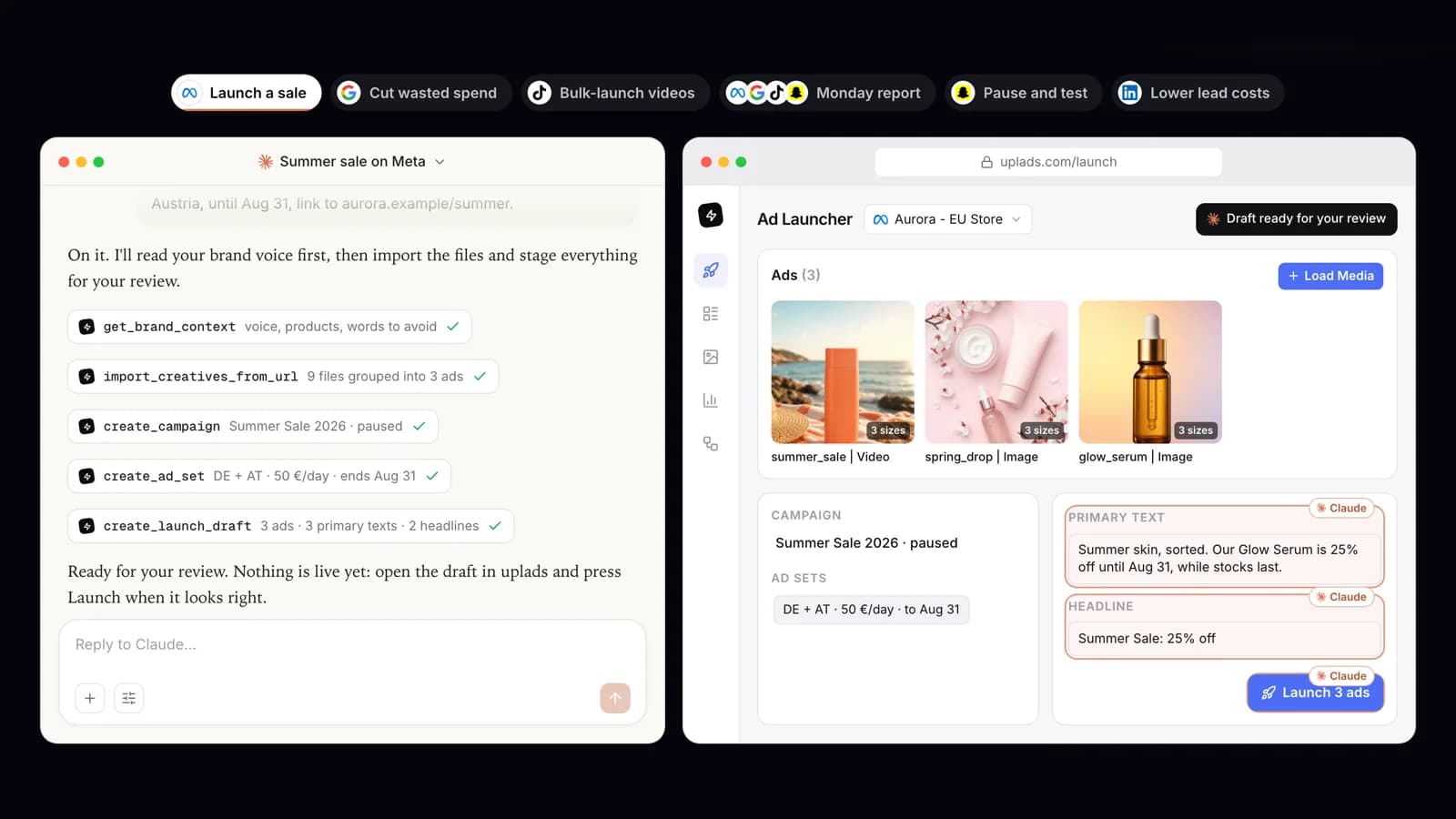
4x5_Offer_1.jpgand9x16_Offer_1.jpg, become one ad with an asset per placement. Meta's tool documentation lists no import from Dropbox or Google Drive. - Paused structure, staged ads.
create_campaignandcreate_ad_setcreate everything paused. New ads land in a launch draft that opens in the uplads Ad Launcher with names, copy, placements and ad sets filled in, and a person checks it and presses Launch. The assistant can change a draft it staged, and a draft launches only once. - Spending rules you set. Pausing and lowering a budget work at any time. Switching something on, raising a budget, loosening a bid or launching without a person needs the workspace's Autonomous launching switch, which is off by default and can carry a daily ceiling on everything assistants put live or raise that day, plus your yes in the chat.
- Edits to ads that already run. Locations, audiences, placements and optimisation goal of an ad set, and the text, image, video, link and button of an ad, carousel cards included. A changed creative gives the ad a new post, so likes and comments start over and Meta reviews the ad again. The assistant can put the previous version back.
- Your voice before your copy. The assistant reads the ad account's Brand Context and saved copy templates before it writes primary texts, headlines and descriptions.
- Audits and rules. It runs Optimize audits of a Meta account against your goals and break-even, and replays an automated rule over recent real numbers (a dry run) before you switch it on.
- One record. Every import, change, rule and draft lands in the workspace audit log, marked as coming from MCP.
The full list for Facebook and Instagram is on the Meta Ads MCP connector page, and the overview across all five networks on Ads MCP for Claude & ChatGPT. The connector runs on the same account as Meta ads in uplads, so a draft your assistant stages opens in the same Ad Launcher your team uses for its own launches.
Meta's official Ads MCP vs. uplads
| Meta's official Ads MCP server | uplads MCP server | |
|---|---|---|
| Server URL | https://mcp.facebook.com/ads | https://uplads.com/api/mcp |
| Networks | Meta (Facebook and Instagram) | Meta, Google Ads, TikTok, Snapchat; LinkedIn for running campaigns |
| Sign-in | Facebook Login for Business, or an access token | Your uplads account (OAuth 2.1), no API key |
| Your own Meta app | Not needed for the advertiser connector; the developer route and agency access run through your app | Not needed |
| New campaigns, ad sets, ads | Created paused; confirmation before activation; agent work arrives as an Ads Manager draft | Campaigns and ad sets created paused; ads staged as a draft in the uplads Ad Launcher |
| Going live from the chat | Explicit approval, plus MCP server rules a portfolio admin sets | Off by default; workspace switch, optional daily ceiling and your yes in the chat |
| Creative import | Not in the tool documentation | Dropbox and Google Drive links, whole folders, grouped by placement |
| Custom audiences | Create, update, delete | Read and use in targeting |
| Catalogs | Create and manage | Create and manage; each product change needs your yes |
| A/B tests and lift studies | ||
| Automated rules | Not in the documented tool categories | Created on Meta and TikTok; dry run on real numbers on Meta |
| Account audits | Not in the documented tool categories | Optimize audits against your goals and break-even |
| Change history | Activity log of the ad account | Ad account change journal, plus the uplads audit log for every assistant action |
| Price | No price on Meta's pages | Included in every uplads plan, from 69 EUR a month |
Read the table as two different jobs. Meta's server is a direct, first-party line into one network, with the measurement tools only Meta can offer. uplads is a working layer for teams: it brings the creatives in, applies the team's naming, voice and spending rules, and spans the networks a client actually runs on.
How to connect Meta Ads to Claude
Connect Meta Ads to Claude with uplads
- 1
Connect Meta in uplads
Start the 7-day trial, then under Configuration → Connections sign in with Facebook and pick your ad accounts. You do this once.
- 2
Add the connector in Claude
Open Customize → Connectors (Settings → Connectors in some versions), click + Add, choose Add custom connector, name it uplads and paste https://uplads.com/api/mcp.
- 3
Sign in
Click Connect, sign in with your uplads account and approve the consent screen. There is no API key to copy.
- 4
Switch it on in a chat
Open the + menu in a new chat, choose Connectors and turn uplads on. Then ask which ad accounts you have in uplads to check the connection.
Claude Code takes one command, claude mcp add --transport http uplads https://uplads.com/api/mcp, followed by /mcp to sign in. Cursor, VS Code and Codex use the same URL in their MCP config, and the setup help article has the snippet for each client.
Free Claude plans allow one custom connector. On Team and Enterprise plans an owner adds it under Organization settings → Connectors first, and members then connect it themselves, as Anthropic's connector guide explains.
To use Meta's own connector in Claude instead, add a custom connector with https://mcp.facebook.com/ads, click Connect, sign in through Facebook Login and choose the business portfolios to share, as Jon Loomer's walkthrough shows. For Claude Code, Meta's get started guide uses your own Meta app ID as the OAuth client: claude mcp add --transport http --client-id <META_APP_ID> meta-ads https://mcp.facebook.com/ads.
How to connect Meta Ads to ChatGPT
ChatGPT has moved its custom MCP settings more than once. OpenAI's current developer guide describes this path on ChatGPT web:
Connect Meta Ads to ChatGPT with uplads
- 1
Open Plugins
In ChatGPT on the web, go to Plugins, click + and choose Add custom MCP server. Some workspaces show it under Settings → Connectors instead.
- 2
Paste the URL
Name it uplads, enter https://uplads.com/api/mcp as the server URL and choose OAuth for authentication.
- 3
Confirm and sign in
Accept the risk warning, create it, install it and authorize with your uplads account when ChatGPT asks.
- 4
Start with a check
In a new chat, ask which ad accounts you have in uplads, then send your first brief.
Whether you can add a custom MCP server depends on your ChatGPT plan and workspace permissions. If the option is missing, that is a ChatGPT setting, not a uplads one.
For Meta's own server in ChatGPT, Meta's get started guide describes the developer route: set a redirect URL in your Meta developer app, choose OAuth in ChatGPT's developer mode and enter your app ID as the OAuth client ID. Advertisers without an app are sent to Meta's Help Center guide for its AI connectors.
When is Meta's own MCP server enough?
There are real cases where you need nothing else:
- You are building your own Meta-only agent. Meta's server is first-party and documented, and nothing sits between your code and Meta. If you own the Meta app and the agent logic anyway, a second layer adds little.
- You need Meta's measurement tools from the chat. A/B tests, conversion lift studies, creating and editing custom audiences, and dataset diagnostics are in Meta's documented tools and not in the uplads connector.
- You run one Meta account on your own. If you mainly ask performance questions and approve each activation yourself in Ads Manager, the official server covers it.
Which Meta Ads MCP server should you use?
For most advertisers, and for every agency, use uplads. The reasons are the parts of the job a plain Meta server leaves to you: creatives that sit in Dropbox or Drive folders, ads in several sizes that should become one ad, clients on Google Ads, TikTok, Snapchat and LinkedIn as well as Meta, team members with different permissions, a launch screen where someone checks the work, and spending rules that hold no matter which assistant a colleague uses.
Use Meta's own server if you are a developer building a Meta-only agent on your own app, or if your work in the chat is mostly Meta's experiments and diagnostics. You do not have to choose forever. Both connectors can sit in the same Claude or ChatGPT account, and connecting uplads changes nothing about Meta's server.
uplads for advertisers and agencies that launch and manage ads for real; Meta's official server for developers building a Meta-only agent on their own app
Meta's server is the first-party line into Meta, with A/B tests, lift studies and diagnostics. uplads adds what a team needs around it: five networks behind one connection, folder imports grouped by placement, drafts reviewed before launch, spending rules and one audit log.
Meta did the important part right: its tools create everything paused and ask before they activate. What it does not try to be is a team's working layer across networks, and that is the gap uplads fills. Start with the uplads connector for the launches and day-to-day changes, and add Meta's own server next to it if you need its experiments.
Connect Meta Ads to Claude or ChatGPT
The uplads MCP server is included in every plan (see pricing, from 69 EUR a month), with a 7-day free trial and no credit card. It runs on the official Marketing API through an app Meta reviewed, creates everything paused and stages new ads for your review.