
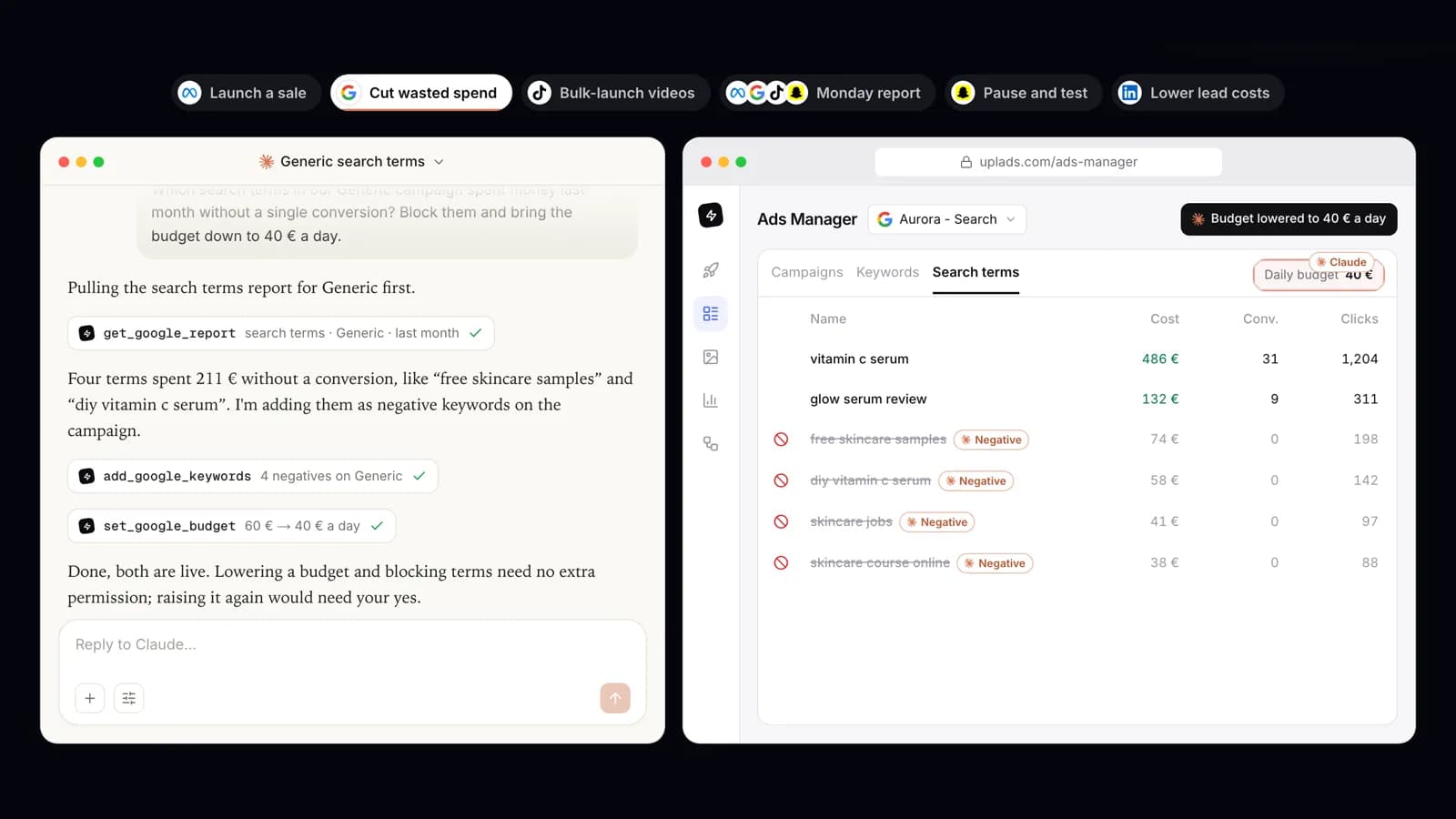
A Google Ads MCP server connects an AI assistant such as Claude or ChatGPT to your Google Ads account through the Model Context Protocol, so you can ask "which campaigns lost money this week?" and get an answer from live data. Google publishes an official one. It is free, open source and good at reporting, and as of October 2026 it changes nothing in your account. This guide explains what it does, shows how to connect Google Ads to Claude and to ChatGPT both ways, and ends with a recommendation for each kind of user.
What is the Google Ads MCP server?
MCP is the open standard behind the connectors in Claude, ChatGPT, Cursor and other AI clients. A server exposes a set of functions, and the assistant discovers them and calls them when your question needs one. For the bigger picture, read what MCP means for advertisers.
The official Google Ads MCP server is Google's own implementation for the Google Ads API. It is a Python project, published on GitHub under the Apache 2.0 license, and it gives the assistant three tools:
list_accessible_customersreturns the Google Ads accounts your login can reach.searchruns a Google Ads Query Language (GAQL) query, the API's SQL-like language for metrics, budgets and statuses.get_resource_metadatadescribes a resource such as "campaign", so the model knows which fields it may query.
That is a small surface, and a deliberate one. Because search takes any GAQL query, the assistant can answer most reporting questions the API can answer, provided it writes a valid query. Google pairs the server with optional agent skills that teach the model GAQL with fewer tokens.
Two setup facts changed in 2026. Developer tokens were sunset on 9 September 2026, and the latest version of the server no longer asks for one, because API access levels (Explorer, Basic or Standard) now belong to the Google Cloud project. The server runs over stdio on your own machine or over Streamable HTTP, for example on Google Cloud Run, and it signs in with OAuth 2.0 or a service account. Google last updated the page on 16 October 2026.
"Google Ads MCP server" also describes community projects and connectors built into ad tools, uplads among them. They speak the same protocol but differ in who runs them and what they are allowed to do.
Is the official Google Ads MCP server read-only?
Yes. In a note under its tool list, Google's documentation says: "This implementation is strictly read-only." The same note spells out that it cannot change bids, pause campaigns or create new assets, and the key specifications list the mode as read-only for the current release. The page makes no promise of write support. For mutate operations it points developers to the Google Ads API Developer Assistant, a plugin for Claude Code and Antigravity that generates client library code you then run yourself.
In practice the assistant can find the search terms that wasted money last month, and you add the negatives in Google Ads. It can tell you which campaign is overspending, and you change the budget. For an analyst that is often enough. For anyone who hoped the assistant would save them the clicks, this is where Google's server stops.
Read-only has a real upside too. Nothing can go wrong in the account. Connect it to a client account and the worst outcome is a wrong answer.
Are there Google Ads MCP servers that can make changes?
Yes, from the community. Glama's MCP directory lists at least 20 Google Ads servers, and several of them write: pausing and enabling, daily budgets, keywords, new campaigns. They vary a lot. One example, bertramdev/GoogleAdsMCP, is a self-hosted Python server covering campaigns, budgets, keywords and Performance Max; its removal tools ask for a confirmation flag, while status changes run immediately. Other projects create new campaigns paused or cap the size of a budget change. You install them yourself with your own Google credentials, and the guardrails are whatever the maintainer built.
How to connect Google Ads to Claude
There are two routes, one per server.
With Google's official server. Claude Desktop and Claude Code can start a local server from a config entry. This is the entry Google documents for its server:
{
  "mcpServers": {
    "google-ads-mcp": {
      "command": "pipx",
      "args": [
        "run",
        "--spec",
        "git+https://github.com/googleads/google-ads-mcp.git",
        "google-ads-mcp"
      ],
      "env": {
        "GOOGLE_PROJECT_ID": "YOUR_PROJECT_ID",
        "GOOGLE_APPLICATION_CREDENTIALS": "/path/to/credentials.json"
      }
    }
  }
}
Before it answers anything you need pipx, a Google Cloud project with Explorer, Basic or Standard access to the Google Ads API, and OAuth credentials: an OAuth client, or application default credentials from gcloud auth application-default login. If you reach accounts through a manager account, also set GOOGLE_ADS_LOGIN_CUSTOMER_ID.
Claude in the browser cannot reach a server on your laptop. Google's route there is a Cloud Run deployment: build and push the image, deploy it with a Web application OAuth client, add the Google Ads scope to your consent screen and Claude's callback URL to the client's redirect URIs. Then add a custom connector in Claude that points at your Cloud Run URL with /mcp at the end. Google also mentions a hosted endpoint pilot for allowlisted participants.
With uplads. Nothing to deploy. You connect Google once inside uplads, and Claude reaches it through one URL.
Connect Google Ads to Claude through uplads
- 1
Connect Google Ads in uplads
Start the 7-day trial, open Configuration → Connections, sign in with Google and pick the Google Ads accounts you want to work on.
- 2
Add the connector in Claude
In claude.ai or the desktop app, open Customize → Connectors, click + Add and add a custom connector named uplads with the URL https://uplads.com/api/mcp and click Connect.
- 3
Sign in and approve
Sign in with your uplads account and approve the consent screen. The connector uses OAuth 2.1, so there is no API key or developer token to copy.
- 4
Ask for the numbers first
Start with: which Google Ads accounts can you see? Then ask how a campaign did before you ask for a change.
Claude Code takes one command, claude mcp add --transport http uplads https://uplads.com/api/mcp, and then /mcp to sign in. The help article on connecting Claude or ChatGPT covers every client, how to check the connection, and how to revoke it in one click.
How to connect Google Ads to ChatGPT
With Google's official server. Google's documentation connects ChatGPT the same way as Claude in the browser: through your own Cloud Run deployment, with ChatGPT's redirect URL registered on your OAuth client and a custom connector pointing at the deployed /mcp URL. Without that deployment there is nothing for ChatGPT to reach.
With uplads:
- Connect Google Ads in uplads as described above.
- In ChatGPT, open Apps & Connectors (Plugins in newer versions), add a custom connector and paste https://uplads.com/api/mcp.
- Authorize it with your uplads account when ChatGPT asks.
Custom connectors are only available on ChatGPT plans that allow them. If you do not see the option, that is a restriction on ChatGPT's side, not a uplads setting. The same URL works in Cursor, VS Code, Codex CLI and any other client that speaks Streamable HTTP, and the Google Ads connection is shared with all of them.
What can Claude or ChatGPT change in Google Ads through uplads?
The Google Ads MCP connector in uplads reads campaigns, ad groups, asset groups, ads, keywords and performance, and then acts on them under your permissions. These are requests it handles today:
- "Which search terms are wasting money?" It reads the search terms report (
get_google_report) for a campaign or ad group and adds the terms you agree on as negative keywords (add_google_keywords), on the ad group or on the campaign's own negative list. Negatives only ever narrow spend. - "Add these keywords to the Brand ad group." New positive keywords are created paused, so nothing starts buying clicks on terms nobody approved.
- "Cut the Summer campaign to 40 a day." Lowering a daily budget (
set_google_budget) goes through at once. Raising one needs the workspace's autonomous switch, has to fit under the daily ceiling you set, and needs your yes to the exact number in the chat. Shared budgets are refused, because changing one would move every campaign on it. - "Rewrite the two weakest headlines." It edits the headlines, descriptions, display paths and URLs of an ad, and the texts, final URL, paths and call to action of a Performance Max asset group. The ad keeps its stats and goes back into Google's review.
- "Set up a paused Demand Gen campaign for Austria." It creates Search, Display, Demand Gen, Performance Max and App campaigns, always paused and without ads.
- "Turn our three best Meta ads into a new asset group."
import_meta_ads_for_googlecopies the Meta ads' images and videos into the Google account's library and fits their text to Google's limits. The new asset group is then staged as a draft, and Demand Gen ads and YouTube video ads are staged the same way. You review the draft in the uplads Ad Launcher and press Launch. - "Add the new product shots to the running asset group." Images and videos added to running asset groups, or to an App campaign, go live once Google approves them, so that launch is always active.
- "Who changed the Brand campaign's bids last week?"
get_google_change_historyreads the last 30 days of the account's change history, with old and new values, filtered by campaign, kind of change, client or person.
The rules around those requests are what make it safe on a client account. Pausing and lowering need no permission. Switching something on, raising a budget or loosening a bid needs the autonomous switch under Configuration → MCP plus your yes, and everything assistants put live or raise in a day counts against one daily ceiling. Most changes can run as a dry run that Google checks without saving. The assistant removes only what an assistant created through uplads; your own campaigns and keywords are only ever paused. A view-only member cannot change anything, a workspace without a plan is read-only, and every change lands in the audit log, marked as coming from MCP.
It also has limits worth knowing before you ask. No tool writes new Search ads and the Ad Launcher has no Search ads, so a Search campaign it creates starts empty and you write the ads in Google Ads. Google's API does not allow creating Video campaigns, so those are neither created nor copied here, though new YouTube video ads can be staged into an existing one.
The same connection reaches Meta, TikTok and Snapchat, where the assistant builds paused structure, stages new ads for review and manages what runs, and LinkedIn, where it manages what already runs. The page on the ads MCP for Claude & ChatGPT covers all five networks. The connector is in beta and included in every uplads plan.
Google's Google Ads MCP vs. uplads
| Google Ads MCP server (Google) | uplads | |
|---|---|---|
| Who runs it | You, locally or on your own Cloud Run | uplads, hosted at uplads.com/api/mcp |
| What you set up | Google Cloud project with API access, OAuth client or ADC, config file | A Google sign-in inside uplads, one URL in your client |
| Reporting | Any GAQL query the model can write | Performance plus keywords, search terms, audiences, locations, devices, ad schedule and assets reports |
| Pause, enable, budgets, bids | yes (raising spend needs your yes) | |
| Negative keywords from search terms | ||
| Edit ad and asset group texts | ||
| Create campaigns | Paused, without ads | |
| Stage new asset groups and ads for review | ||
| Write new Search ads | ||
| Meta, TikTok, Snapchat and LinkedIn | Same connection | |
| Developer token or API key | Not since 9 September 2026 | None |
| Price | Free, Apache 2.0 | MCP in every plan; Google Ads on Growth (199 EUR a month, net) and Agency, 7-day trial |
Google's server has real strengths. It is official and free. GAQL reaches fields that no fixed report covers. And your account data goes from Google straight to your own machine or Cloud project, with no third-party tool in between. uplads trades raw query freedom for actions with guardrails, a review step before anything new goes live, and one connection for five networks. Plans and limits are on the pricing page.
Which Google Ads MCP server should you use?
Use Google's official server if all three are true: you only want answers and never changes, you or a developer are comfortable running a Python server with a Google Cloud project and OAuth credentials, and you value writing your own GAQL. An analyst reporting on their own accounts fits that profile well.
Use a community server if you want writes on your own accounts and are prepared to read its code, judge its guardrails and keep it updated yourself.
Use uplads for everything else: when the assistant should make the change rather than describe it, when your team needs roles, an audit log and a review step, when you run Meta, TikTok, Snapchat or LinkedIn next to Google, or when nobody wants to maintain a Cloud project for a chat window.
uplads, for anyone who wants the assistant to make the change
Google's official server reads well and changes nothing. uplads reads the same day-to-day reports, acts on them under spend rules you control, and covers Meta, TikTok, Snapchat and LinkedIn on the same connection.
Pick Google's server only if you want read-only reporting and are happy to run it yourself. For a marketer or agency that wants the negatives added, the budget cut and the next asset group staged for review, uplads is the Google Ads MCP server to connect.
Connect Google Ads to Claude or ChatGPT
Ask about search terms, budgets or a tired headline, and your assistant makes the change in Google Ads through uplads. New asset groups and ads wait for you to press Launch, and anything that raises spend waits for your yes. Google Ads is in the 7-day trial, no credit card.
If your bottleneck is getting many creatives into Google rather than chatting with an assistant, the Google Ads bulk launcher turns one upload into Performance Max asset groups, Demand Gen, YouTube and App ads without the MCP connector.