Preview links · Facebook and Instagram
Facebook ad preview link,one for the whole batch.
Share one Facebook ad preview link for the whole batch: your client sees every ad in every placement without a login and comments right on the ad.
- Every ad in every placement, one URL
- No login for your client
- Comments on the ad, approval if you want it
7-day free trial · No credit card
One link per batch
Forty ads. One link.
How it works
Share once. Launch what was agreed.
- 01
Build the batch
Creatives, ad sets and copy in the Ad Launcher. Nothing goes to Meta yet.
- 02
Share
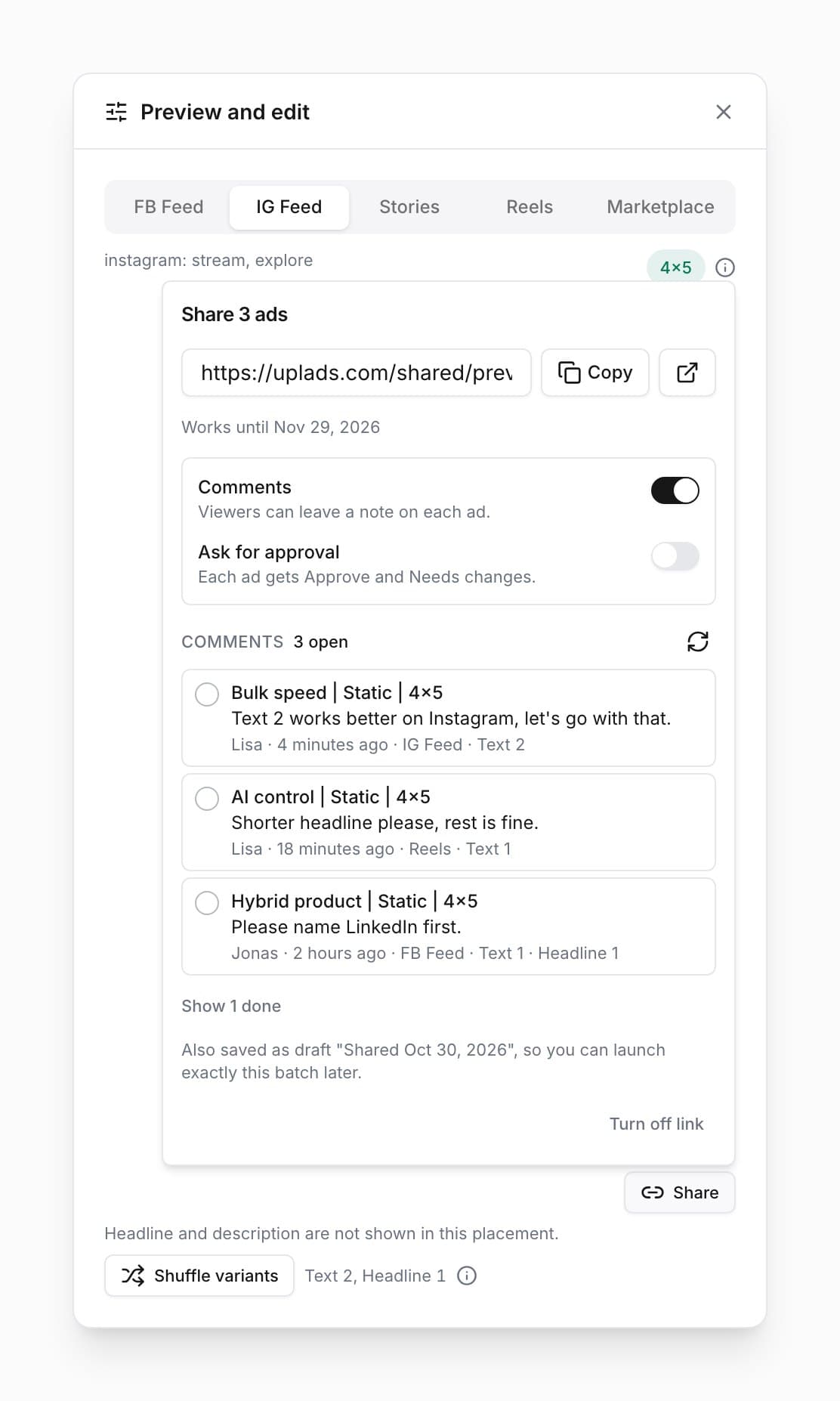
One click in the preview. The batch is saved as a launch draft.
- 03
Your client comments
On any ad, placement and text, on a phone or a laptop.
- 04
Launch
Tick off the comments, load the draft, launch.
Comments land where you launch
Every note with the ad, placement and text it is about, right on the Share button.
Built in
No screenshots. No forty links.
One link
The whole batch behind one URL, not one link per ad.
Five placements
FB Feed, IG Feed, Stories, Reels and Marketplace.
Every text
Your client clicks through each text and headline.
Comments in context
Each note keeps the placement and text it is about.
Approval, if you want
One switch adds Approve and Needs changes per ad.
Private
Not indexed. Comments or the whole link off any time.
Frequently asked questions
Does my client need a Facebook or uplads account?
No. The link opens in any browser without a uplads, Facebook or Business Manager login. Anyone who has the link can open it until it expires after 30 days or you turn it off.
What does my client see?
Every ad of the batch with its creative, primary text, headline, call to action and link, in Facebook Feed, Instagram Feed, Stories, Reels and Marketplace. With several texts or headlines, they click through each one. Carousels show all their cards.
How do comments work?
Your client writes a note on any ad and gives their name once. Each comment remembers the placement and text it was written on, and you read and tick them off in the launcher. Comments are on by default; switch them off any time.
Can my client approve the ads?
If you want. Turn on Ask for approval and each ad gets Approve and Needs changes, and the launcher counts the answers. Approval launches nothing: you load the saved draft and press Launch.
Does it work for TikTok, Google Ads, Snapchat or LinkedIn?
Not yet. Preview links are for Meta batches, which covers Facebook and Instagram placements. The other four networks launch from the same workspace, for now without a preview link.
Related
Bulk Facebook Ads Upload: Launch 50+ Meta Ads in One Pass
Bulk facebook ads upload built for agencies and performance teams. Drag in 200+ creatives, group placements, apply naming, launch. No more 50-tab Ads Manager.
Multi Placement Facebook Ads: One Ad, Every Ratio
Multi placement facebook ads served at the right ratio per placement. uplads groups 4×5 + 9×16 + 1×1 variants into one ad automatically - no parallel ads.
AI Ad Copy Generator: Meta, TikTok, Google, Snap & LinkedIn
AI ad copy inside your launch flow for Meta, TikTok, Snapchat, LinkedIn and every Google channel. Brand voice per account, website briefs, 10 languages.
Share the batch,not forty screenshots.
Build the batch, share one link, read the comments where you launch.
No credit card · Cancel anytime