
If you search "utm parameters meta ads 2026" the top results split into two camps that never quite meet: generic UTM explainers that were not written for Meta, and Meta guides that have not caught up to what changed this year. Meanwhile the most honest result on the page is a Reddit thread where someone asks, plainly, whether you are even supposed to build URL parameters on Facebook ads at all. That confusion is the real state of this topic in 2026, so this is the version that answers both questions: what actually changed, and the setup that survives a real launch cadence.
I build the launch tooling for an Austrian performance marketing agency that runs paid ads for ecommerce brands. The UTM scheme was never the thing that broke. Deciding utm_medium=paid_social takes one meeting. What broke, every week, was a junior launching forty ads where two of them missed the string or carried a typo, and nobody noticing until a month later when GA4 showed a chunk of paid spend as "Unassigned" and the client asked why revenue did not reconcile. The parameters are simple. Keeping them identical across every ad you ship is the part this piece is really about.
What are UTM parameters on Meta ads?
UTM parameters are short tags appended to an ad's destination URL so an analytics tool, almost always Google Analytics 4, can attribute the visit and any resulting conversion back to the exact ad that produced the click.
Meta exposes them through a field called URL parameters on the ad. You do not type them into the URL yourself; you put the query string into that field, without a leading question mark, and Meta attaches it to whatever the person clicked. Meta does not use these tags for its own in-platform reporting. They exist entirely for the downstream tool, which is the whole point: they give you a source of truth that is independent of Meta's own attribution. The standard scheme has six fields, and per Google Analytics Help on campaign URLs each one answers a specific question: utm_source (what platform), utm_medium (what kind of traffic), utm_campaign (which campaign), utm_content (which ad), utm_term (which ad set or audience), and utm_id (a stable key that joins the click to cost data).
What changed for UTM parameters on Meta ads in 2026?
The parameters did not change at all in 2026. What changed is where the builder lives and how much the rest of your measurement now depends on it.
The concrete platform change: Meta consolidated the URL Parameters builder into the Tracking section of Ads Manager, where it was previously also reachable from the Destination section of the ad. The builder is unchanged and still functions the same way; this is purely a location change. That detail matters because the single most common 2026 question about Meta UTMs is some version of "the builder is gone" or "it moved and I broke something". It did not break. It moved one panel over, into Tracking, at the ad level.
The second shift is not a feature, it is a consequence. As Meta's reported attribution windows tighten and the in-platform numbers drift further from what your analytics and your bank account say, the independent UTM layer stops being a nice-to-have. The 2026 detail people miss here is utm_id. It is no longer just another label; it is the join key that lets GA4 line up a click with imported cost data, which is how you reconcile Meta-reported results against GA4-attributed revenue at all. A scheme without utm_id still tracks sources; it just cannot do the cost reconciliation that the widening gap now forces on you.
The UTM scheme that holds for Meta ads in 2026
Use a fixed six-field scheme: static values for source and medium, Meta dynamic macros for everything that changes per campaign, and utm_id as the cost-join key.
| Parameter | What it answers | Recommended Meta value |
|---|---|---|
utm_source | Which platform | facebook or instagram |
utm_medium | Which kind of traffic | paid_social (never cpc) |
utm_campaign | Which campaign | {{campaign.name}} |
utm_content | Which ad | {{ad.name}} |
utm_term | Which ad set or audience | {{adset.name}} |
utm_id | The cost-join key for GA4 | {{campaign.id}} |
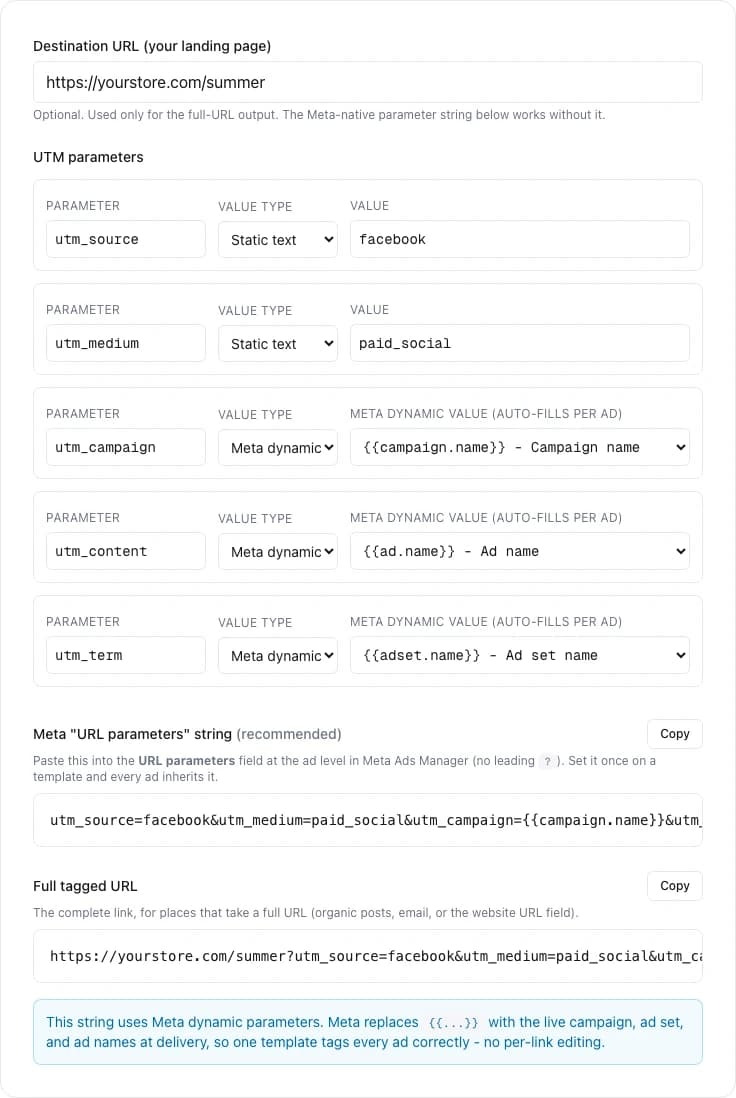
As a single string in Meta's URL parameters field, that is utm_source=facebook&utm_medium=paid_social&utm_campaign={{campaign.name}}&utm_content={{ad.name}}&utm_term={{adset.name}}&utm_id={{campaign.id}}. Three rules keep it clean. Lowercase everything, because GA4 treats Facebook and facebook as two different sources and you will spend a quarter explaining why one campaign is split in two. Use underscores or hyphens, never spaces, because a space becomes %20 and your reports turn ugly fast. And use paid_social as the medium, not cpc: cpc is the convention for paid search, and mixing the two destroys GA4's default channel grouping so paid social and paid search blur into one bucket.
Static UTM values vs Meta dynamic parameters
Use static values for the fields that never change and dynamic macros for the fields that change every campaign. That hybrid is the only version that stays correct across a real launch cadence.
Static values are explicit. You can read the string and know exactly what it will record. The cost is that someone has to enter them correctly on every launch, and "every launch" is where discipline quietly fails. Meta dynamic parameters solve that for the variable fields: a macro like {{campaign.name}} is filled in by Meta at delivery from your actual structure, so it can never be mistyped and never goes stale. The trade is that a macro is only as readable as the thing it copies. {{campaign.name}} resolves to whatever your campaign is literally called, so a campaign named Q2 SALE!! final (3) produces a UTM value you cannot use. Dynamic macros do not remove the need for a naming convention; they make a clean Meta naming convention the thing your attribution silently depends on. Here is the full macro set Meta supports, per the Meta specifications for URL dynamic parameters:
| Macro | Resolves to |
|---|---|
{{site_source_name}} | Where it served: fb, ig, an, msg |
{{campaign.name}} / {{campaign.id}} | Campaign name / ID |
{{adset.name}} / {{adset.id}} | Ad set name / ID |
{{ad.name}} / {{ad.id}} | Ad name / ID |
{{placement}} | The placement that served the click |
Where the URL Parameters builder is in Meta Ads Manager now
It is at the ad level, inside the Tracking section. Open the ad, scroll to Tracking, and you will find the URL parameters field plus a "Build a URL parameter" link that opens Meta's small builder.
The practical confusion in 2026 is not how the builder works, it is people looking for it where it used to be. It was previously also surfaced near the Destination section where you set the website URL; now the canonical home is Tracking. Two things worth knowing once you find it. First, the field expects the query string only, with no leading question mark, because Meta joins it to the URL for you; if your destination URL already contains a ?, Meta handles the join, but a hard-coded ? in the wrong place is a classic way to produce a malformed tracked link. Second, the builder writes the same string this article describes, so once you have a scheme there is little reason to reopen the builder per ad; the value is identical every time, which is exactly what makes the manual per-ad version so wasteful.
The mistakes that send Meta ad spend to GA4 "Unassigned"
The reason paid social shows up as Unassigned or direct in GA4 is almost never the pixel. It is the UTM string: missing, malformed, mismatched to GA4's channel rules, or stripped before GA4 sees it.
The recurring offenders, in roughly the order they cost agencies money: an ad launched with no URL parameters at all, so the click has nothing to attribute; a medium GA4 does not map to paid social, so a correctly tagged click still falls into Unassigned; inconsistent capitalisation splitting one real source into two; a landing-page redirect that drops the query string before GA4's tag fires, which makes a perfectly tagged ad look untracked; and UTM tags accidentally placed in the ad name instead of the URL parameters field, which records nothing and corrupts the name your dashboards parse. Notice that almost every item on that list is a consistency failure at launch, not a conceptual misunderstanding. The team knows the scheme. The string just did not make it onto that ad, intact, this time.
Launch 100+ ads in a single click
The scheme is a one-time decision. Applying it identically to every ad is the weekly tax. Launch a full batch of ads in one pass with uplads and the URL parameters string you set goes onto every creative in the launch, verbatim, with no per-ad retyping. See plans and what a batch launch costs.
Why the UTM scheme is the easy half
Here is the part the UTM guides skip: deciding the scheme is the cheap, one-time work. The expensive, recurring work is getting that exact string onto every ad in every launch, identically, forever. A scheme is a meeting. Consistency is an operation, and it gets harder every week you scale, because the failure mode is not "we picked the wrong medium", it is "ad 38 of 60 went out without the string and nobody saw it until the monthly report".
That gap is an operations problem, not an analytics one, and it is the only part of this that uplads touches. If you just need to compose the string, our free Facebook Ads UTM builder writes it for you, with the dynamic macros in place. uplads itself is a bulk launch layer. You set the URL parameters string once for the launch, and it is passed through to Meta verbatim and attached to every creative in that launch, so the same correct string lands on ad 1 and ad 200 without anyone retyping it. It does not author or validate your macros for you, it does not read GA4, and it does not grade your attribution; those are deliberately out of scope, because a launch tool that claimed to do your analytics would be exactly the kind of overclaim this topic is full of. What it removes is the specific failure that breaks Meta UTM tracking in practice: drift across a manual, ad-by-ad fan-out. The naming convention that keeps your dynamic macros readable is applied automatically at launch from your account settings, for the same reason: the thing your attribution depends on should not depend on whoever launched today remembering to type it. Meta and TikTok are the production networks uplads launches into; the UTM workflow described here is Meta-specific by design.
A weekly routine that keeps Meta UTM tracking clean
The teams whose GA4 reconciles do not have a smarter UTM scheme. They have a standing rule: the scheme is decided once and written down, and no ad ships without it, ever, because shipping it is automatic rather than remembered.
Concretely: agree the six-field string once, store it where launches read it rather than in a doc nobody opens, keep campaign, ad set, and ad names clean enough that the dynamic macros stay readable, and make "every ad carries the string" a property of how you launch rather than a checklist item a tired person ticks at 6pm. The decision logic for the surrounding workflow lives in our guide on how to bulk upload Facebook ads, and the same consistency-at-scale principle applies to creative freshness, which is its own recurring tax covered in Facebook ad fatigue signals. UTM parameters did not get harder in 2026. The builder just moved, and the cost of one inconsistent launch got more expensive to find. The scheme is the easy half. The discipline of never shipping an ad without it is the half that actually decides whether your numbers reconcile.