
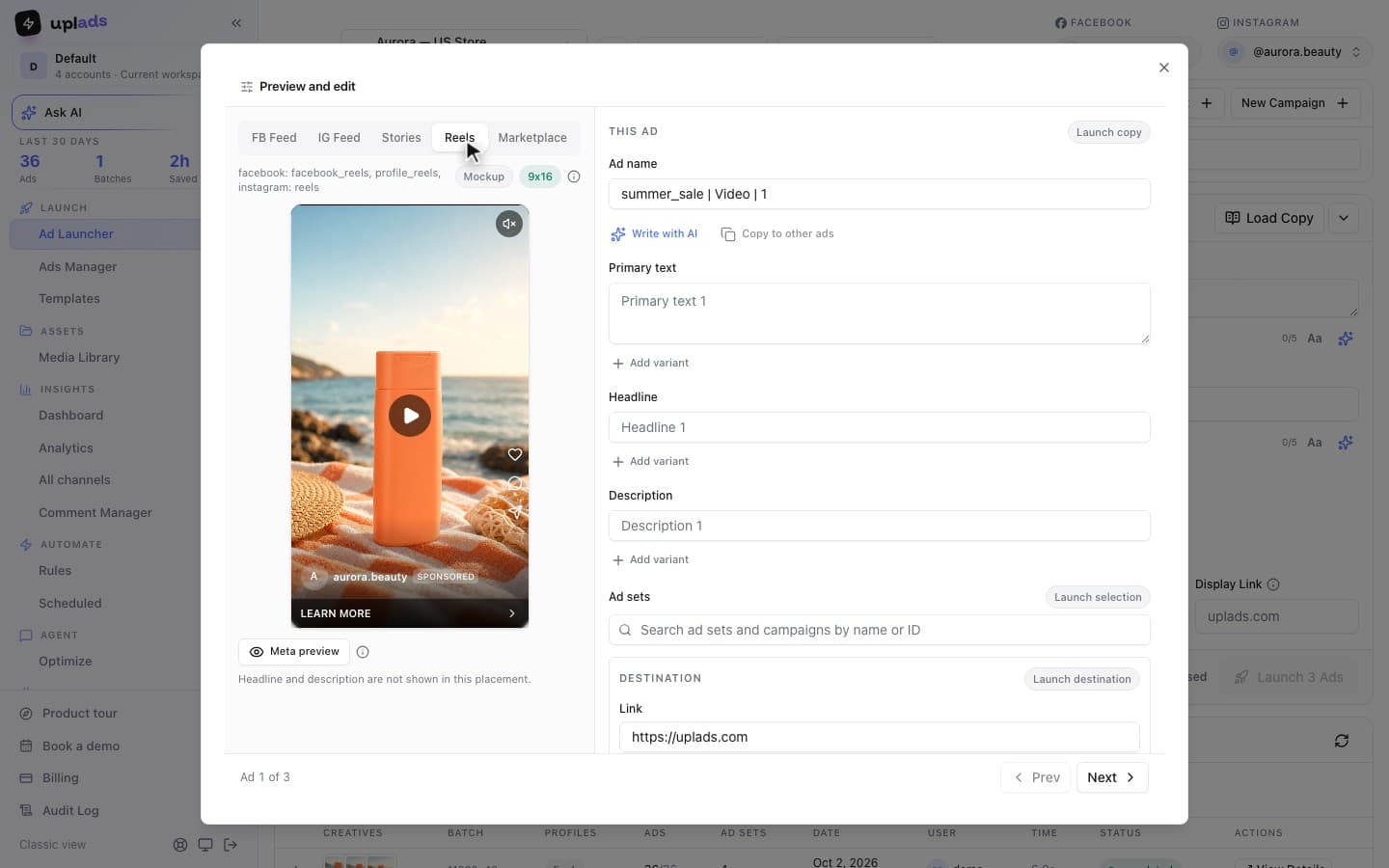
Placements are one of the two levers you set on every Meta ad set, sitting right next to the audience, and they are the lever most teams touch once and never think about again. That is usually the right call for where the ad runs and the wrong call for what the ad looks like when it gets there.
I build the ad-operations tooling for an Austrian performance marketing agency that ships dozens of ad variants per client every week, so placements are not a settings-screen curiosity here: they are the difference between a launch that uses Meta's best real estate and one that quietly letterboxes half its impressions. This guide is the operator version: every placement that exists in 2026, when automatic beats manual, how the campaign objective changes the menu, the aspect ratio each surface actually wants, and where the whole thing stops scaling.
What are Facebook ad placements?
Facebook ad placements are the specific surfaces across Meta's apps where your ad is eligible to appear, each one a different shape and a different viewing context.
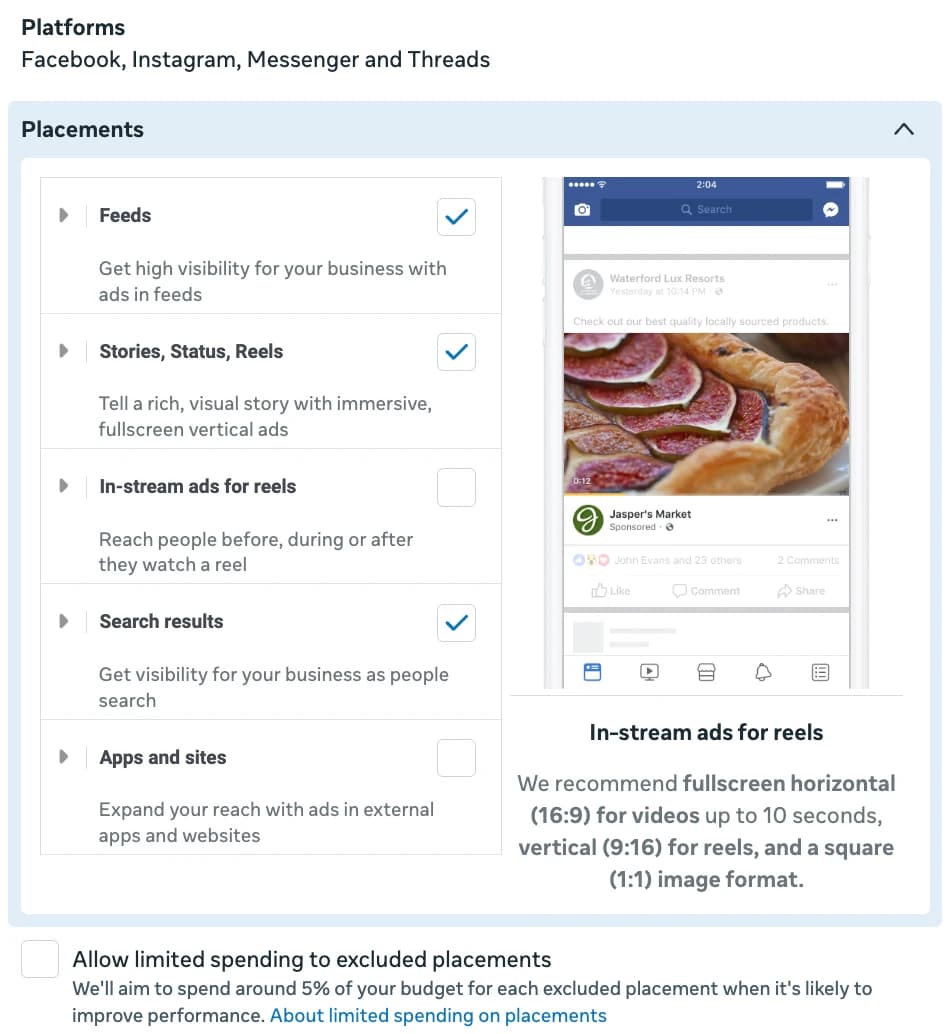
When people say "Facebook ad placements" they mean the full Meta inventory, not just the Facebook app. The same ad can run in the Facebook Feed, the Instagram Feed, Stories, Reels, Marketplace, Search results, the right-hand column on desktop, in-stream video, Messenger, and the Audience Network of third-party apps and sites. You choose this set at the ad set level, and adding more placements widens how many people can be reached without raising the cost of the ad itself. Meta's own placement documentation is explicit that more placements increase the people who can see the ad and do not increase its cost, because the delivery system only spends where it finds efficient delivery.
A quick disambiguation, because the phrase causes it: this guide is about ad placements, the surfaces, not about advertising for a multi-location business. Those are two different problems that share a search box. If you came here for placements, you are in the right place.
The reason placements matter for performance is context. The Feed is a scroll-and-pause environment where a 4×5 owns vertical screen space between organic posts. Stories and Reels are full-screen, sound-on, swipe-driven. Marketplace is a shopping-intent grid. The Audience Network is someone else's app entirely. One creative asset cannot be native to all of those at once, which is the entire reason placement strategy exists.
Every Meta ad placement in 2026
There are roughly a dozen Meta placements in 2026, and they group cleanly into four families by the creative shape each one rewards.
Rather than memorize a list, it is more useful to think in families, because the families map to the aspect ratios you actually have to produce:
- Feeds (1×1 / 4×5). Facebook Feed, Instagram Feed, Facebook Marketplace, Facebook Search results, Instagram Explore, and the Facebook right-hand column. These are vertical-ish, in-line, scroll-context surfaces. 4×5 is the workhorse ratio here; 1×1 is the safe universal fallback.
- Stories, Reels and Status (9×16). Facebook and Instagram Stories, Facebook and Instagram Reels, and Status. These are full-screen, immersive, sound-on surfaces. They want a true 9×16 asset built for full-bleed, not a Feed asset with bars added.
- In-stream and video (16×9). In-stream video on Facebook, and some Audience Network video slots. These behave like short pre-roll and skew landscape 16×9.
- Audience Network and Messenger (mixed). Native, banner and interstitial inventory in third-party apps, plus Messenger inbox and Stories. Shapes vary; Meta adapts the closest asset it has.
Two cross-cutting distinctions sit on top of those families. The first is desktop versus mobile: most Meta inventory is mobile, but the Facebook Feed and the right column run on desktop too, and the right column in particular is a small, low-attention desktop unit that behaves nothing like a full-screen mobile Reel. The second is that the placement set is always evaluated against your target audience: a placement only matters if the people you are trying to reach actually spend time there, which is why the available placements for a niche B2B audience and a broad consumer audience can perform very differently even with identical settings. You are not choosing placements in the abstract; you are choosing where a specific target audience will see a specific creative shape.
The practical takeaway is not the count. It is that those four families collapse into four aspect ratios: 1×1, 4×5, 9×16, and 16×9. Cover the first two and you serve the overwhelming majority of impression volume cleanly. Add the last two and you cover the long tail of in-stream and Audience Network. Every placement decision downstream is really a question about which of those four ratios you bothered to produce.
Automatic (Advantage+) vs manual placements
Use automatic placements by default, and switch to manual only when you have a specific, nameable reason.
Automatic placements, which Meta now brands as Advantage+ placements, let the delivery system test every eligible surface and continuously move budget toward whatever is converting. Manual placements (the setting still labelled "manual placements") let you hand-pick the exact surfaces and exclude the rest. The honest position in 2026 is that automatic wins in almost every account, because the system has more delivery data than any media buyer and reallocates faster than a human reviewing a placement breakdown once a week.
Manual placements still have real, narrow uses. Use them when a brand-safety policy requires excluding the Audience Network entirely, when a creative genuinely only functions full-screen and any Feed delivery is wasted spend, or when you are running a deliberate experiment that isolates one surface to measure it. Outside cases like those, hand-restricting placements is usually a media buyer overriding a system that had better information.
Here is the nuance that costs the most money and that almost no placement guide states plainly: automatic placements decide where your ad runs, not which creative shape is shown there. Turning on Advantage+ placements does not produce a 9×16 for you. If the ad only carries a 4×5, the system still serves that 4×5 onto Reels, just cropped. The placement automation and the creative-per-placement work are two separate jobs. Automating the first does not do the second.
How the campaign objective limits available placements
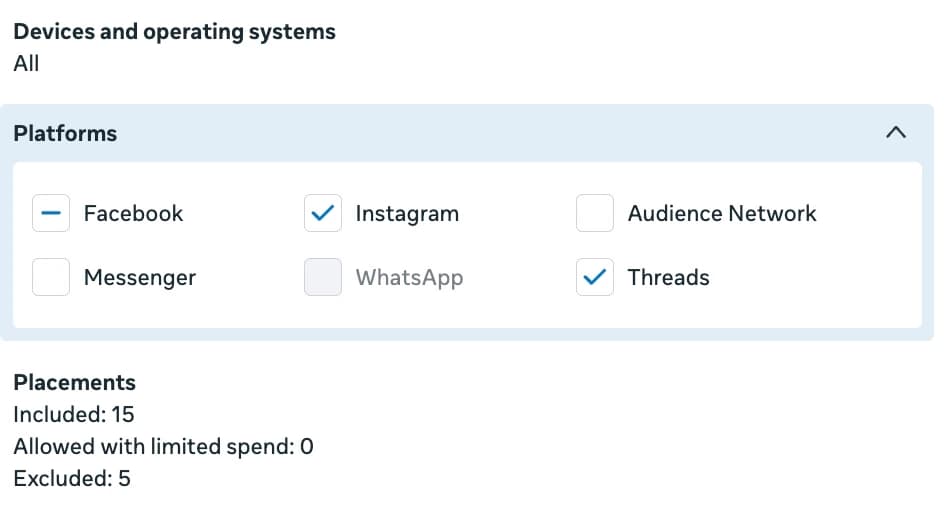
Your campaign objective filters the placement menu before you ever open it, which is why a placement can vanish between campaigns without you changing any placement setting.
Meta builds the list of eligible placements from the objective and optimization you picked, not the other way around. Awareness and Engagement-style objectives expose the widest inventory. Some lead, messaging and app objectives remove specific surfaces: in-stream video and parts of the Audience Network drop out under certain optimizations, and a handful of placements are video-only and disappear for image ads. None of this is configurable from the placements panel; it is decided upstream by the objective.
The operational rule that follows: choose the objective first, then read which placements are actually available under it, and only then decide automatic versus manual. Teams that debug a "missing Reels placement" inside the placements screen are looking in the wrong place. The placement did not move; the objective changed what the placement screen is allowed to show.
Why every placement needs its own aspect ratio
Every placement family wants a specific aspect ratio, and serving the wrong ratio is the difference between a native ad and a bordered screenshot.
This is the spec layer. Meta's ad format guidance publishes the recommended dimensions per format and placement; the version that matters operationally is the four-ratio summary:
1×1
Feed, Marketplace, Search, universal fallback
4×5
Facebook + Instagram Feed (preferred)
9×16
Stories, Reels, Status, full-screen
16×9
In-stream video, some Audience Network
Source: Meta for Business ad format guidance, 2026
Two ratios are the realistic minimum for any account that runs Feed plus Stories or Reels: a 4×5 and a 9×16 of the same creative concept. That pair alone covers the bulk of where impressions go for most advertisers. The four-ratio version (1×1 + 4×5 + 9×16 + 16×9) is for accounts that genuinely lean on Marketplace, in-stream video, and the Audience Network and want every surface served natively rather than adapted.
The cost of skipping this is not abstract. A 9×16 surface is full-screen; a 4×5 stretched or padded onto it leaves dead space, looks like a reposted Feed ad, and underperforms a purpose-built vertical asset on the exact placement Meta most wants to deliver into. The placement is fine. The creative shape is the problem, every time.
One multi-placement ad vs parallel ads per placement
For a single creative concept, one ad that serves the right ratio per placement beats running separate single-ratio ads, on every metric that matters.
There are two ways to get the right shape onto every surface. The slow way is parallel ads: a 4×5 ad for Feed and a separate 9×16 ad for Stories, both targeting the same audience with the same concept. The right way is placement asset customization: one ad that carries both assets plus a rule that tells Meta which asset to serve on which placement. Meta picks the matching ratio per impression and reports it as one ad.
That single-row behaviour is the whole argument, and it is three wins in one:
- Frequency stays honest. When the same person sees the 4×5 on Feed and the 9×16 on Reels, that is one exposure against one frequency budget. Parallel ads count it as two exposures against two budgets, which burns the audience faster than the report admits.
- The learning phase stays whole. Two parallel ads each run their own learning phase on a split signal. One multi-placement ad concentrates the signal and exits learning faster, which matters most on conversion campaigns where the learning window is the testing window.
- Reporting stays readable. Comparing concepts across a week of testing is hard enough at one row per concept. Doubling every row to separate ratios makes the spreadsheet lie by omission.
Run parallel or single-placement ads only for genuine reasons: the Stories creative is a different concept (interactive stickers, vertical-only narrative) rather than a reshaped Feed static, or you are explicitly testing Feed against Reels and need them isolated to read the result. "I forgot to make a 9×16" is not one of those reasons, and it is the most common one.
One concept, every ratio, one ad
uplads groups the 4×5, 9×16, 1×1 and 16×9 variants of a creative into a single ad automatically, inside a normal bulk launch.
How to choose and optimize placements
The optimization workflow is short: default to automatic, supply the ratios, read the placement breakdown, and intervene only with evidence.
Here is the decision sequence that survives contact with a real account:
The placement workflow that scales
- 1
Pick the objective first
The objective decides which placements are even eligible. Set it before you touch the placements panel.
- 2
Default to automatic placements
Turn on Advantage+ placements unless you have a named brand-safety or test reason not to.
- 3
Supply at least two ratios
A 4×5 and a 9×16 of the same concept. Add 1×1 and 16×9 if the account leans on Marketplace and in-stream.
- 4
Build it as one ad, not two
Use placement asset customization so the variants live in one ad, not parallel ads.
- 5
Read the placement breakdown weekly
Look at cost per result by placement after the learning phase, not during it.
- 6
Intervene only with evidence
Exclude a placement only when the breakdown shows it consistently wastes spend across multiple ads, not on one noisy ad.
Reading the breakdown is its own small skill. In Ads Manager, the delivery breakdown by placement splits cost per result across every surface the ad ran on, and that table is the only honest answer to "what is the best placement for Facebook ads" - it is account-specific, not universal. Look at it at the campaign or account level across multiple ads, not one ad at a time, because a single ad's placement split is too thin to trust. A frequent question from advertisers who only ever ship video is whether automatic placements are safe with a video-only creative: they are, because the system simply skips placements your asset cannot fill and spends where the video is eligible, but you still get more delivery if you also supply the ratio each surface prefers rather than one master video for all of them.
Two common mistakes are worth naming because they survive in otherwise good accounts. The first is excluding the Audience Network reflexively: it carries cheap impressions, and outside a strict brand-safety mandate, excluding it removes volume the optimizer was using to find conversions. The second is judging placements during the learning phase, when cost per result is noisy by design; placement decisions made in the first few days of a campaign are usually decisions made on noise.
Running per-placement creative at scale
The concept of multi-placement creative is simple; the cost is doing it for thirty ads a week by hand, and that cost is where most teams quietly give up.
Building one multi-placement ad in Ads Manager is a two-minute job: open the ad, choose to optimize for each placement, and assign the right asset to each placement group. It is fine for two ads a week. For a Monday launch of thirty creatives, each starting from a fresh customization screen with no "apply this to the next twenty-nine" option, it is the whole morning. Meta's UI is correct for the low-volume case and openly hostile to the high-volume one. This is the exact pain that built the macro folder uplads was created to delete: before the tool, the agency kept a document of "duplicate this ad set, reattach these placements" steps that became too embarrassing to keep maintaining.
The math of doing it manually is the part nobody puts on a slide:
uplads removes the per-ad step by treating the placement variant as a property of the creative file, not a setting on the ad. Name the variants with their ratio (summer_sale_4x5.mp4, summer_sale_9x16.mp4, or with embedded dimensions like 1080x1920) and uplads recognises the ratio tokens, treats files that share a base name as variants of one concept, and collapses them into a single multi-placement ad with the right asset assigned to each placement. It handles image-only groups and video-only groups; a mixed image-and-video pairing is something Meta does not allow as one ad, so uplads ships those as separate single-placement ads rather than failing the launch. The naming template you apply at launch uses the base name, so summer_sale_4x5 and summer_sale_9x16 both report under one clean summer_sale ad name.
This runs inside the standard bulk Facebook ads upload flow, not as a separate mode: drop the variants alongside the rest of the week's creatives, the grouped concepts collapse into single ads, the launch is processed in the background in batches of fifty, and a failed group is isolated so the rest of the launch still goes live. On the platform side this grouping is Meta-only today, because it maps to a Meta-specific surface - TikTok launching is live but does not need a grouping step, since a TikTok in-feed ad is a single vertical creative; Google Performance Max asset groups and Snapchat ad squads launch from the same screen, without a grouping step of their own. If your weekly variable is creative rather than products, this is the same operational pattern as creative testing at scale: produce the variants, let the tool group and launch them, read the breakdown, iterate.
Placement strategy is a production problem, not a knowledge problem
The honest summary of Facebook ad placements is that the strategy is short and the execution is the whole game.
Everything that decides placement performance fits on an index card: pick the objective first because it filters the menu, default to automatic placements because the system reallocates faster than you do, supply at least a 4×5 and a 9×16 of every concept because automatic placements pick where the ad runs but not what shape is shown, build the variants into one ad rather than parallel ads so frequency and the learning phase stay whole, and read the placement breakdown weekly across many ads rather than reacting to one noisy ad. None of that is secret. It is in Meta's own documentation and in every competent guide on the first page of results.
The reason placement strategy stays half-finished in most accounts is not a knowledge gap. It is that the correct version is per-ad manual work at a volume that makes skipping it the rational choice on a busy week. A team that knows exactly what to do still uploads one 4×5, enables all placements, and moves on, because the alternative is an hour of identical clicks. That is the real failure mode, and it is an operations failure, not a strategy one. Fix the cost of producing and grouping per-placement creative at scale, the way a bulk launch workflow does, and serving the right ratio on every placement stops being the step everyone quietly drops and starts being the default the account simply has. Get the four ratios produced, let the launch group them, read the breakdown, and iterate. That is the entire job.